
How to Run Scripts in Delta Executor (6 Steps)
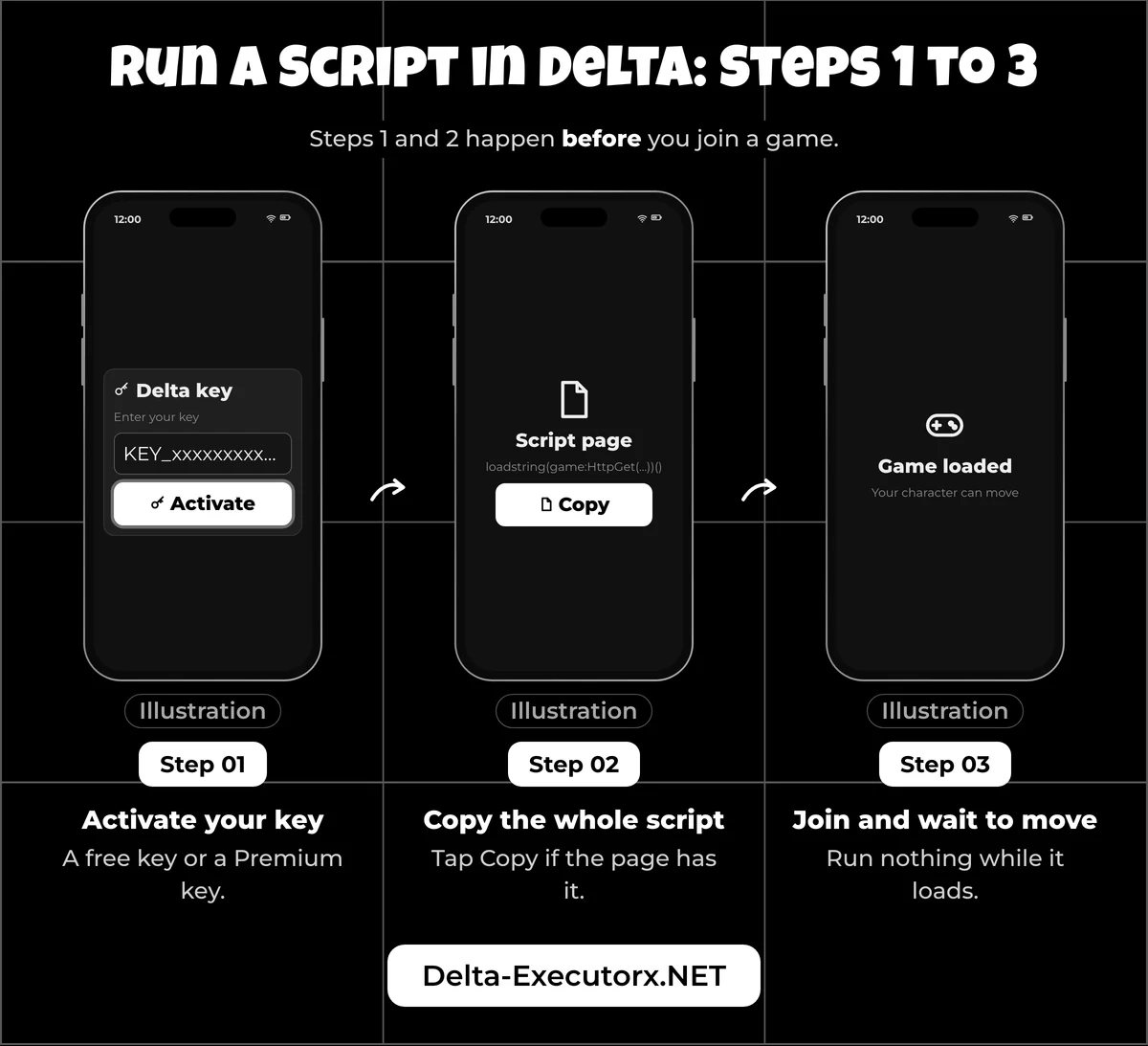
A Roblox script is Luau text that Delta runs inside the game you joined, and executing one takes six steps. Steps 1 and 2 happen before you join a game and steps 3 to 6 happen inside a live server, so timing matters as much as the paste.
If Delta isn't on your phone yet, grab the latest Delta Executor APK and set it up before you start, because none of the steps below work without the app.
Step 1: Activate Your Delta Key
Delta only runs scripts once you have an active key: a free one earned through website tasks, or a Premium key you buy to skip those tasks. The tasks, the key page and what each button there does are covered in the guide to getting a Delta key. With the key accepted, the executor is ready for a script.
Step 2: Copy the Whole Script
Open the page that holds the script and copy every line of it. If the page has a Copy button, use it, since it grabs the full text in one tap. A script that is missing its first or last line will fail, so the copy step deserves a second look before you move on.
Step 3: Join a Game and Wait to Move
Open Roblox through Delta, join the exact game the script targets, and wait until you're in the world and your character responds. Running a script while the game is still loading can crash Roblox or simply do nothing, so "can I walk around?" is the simplest check that the game is ready.
Step 4: Tap the Floating Delta Icon
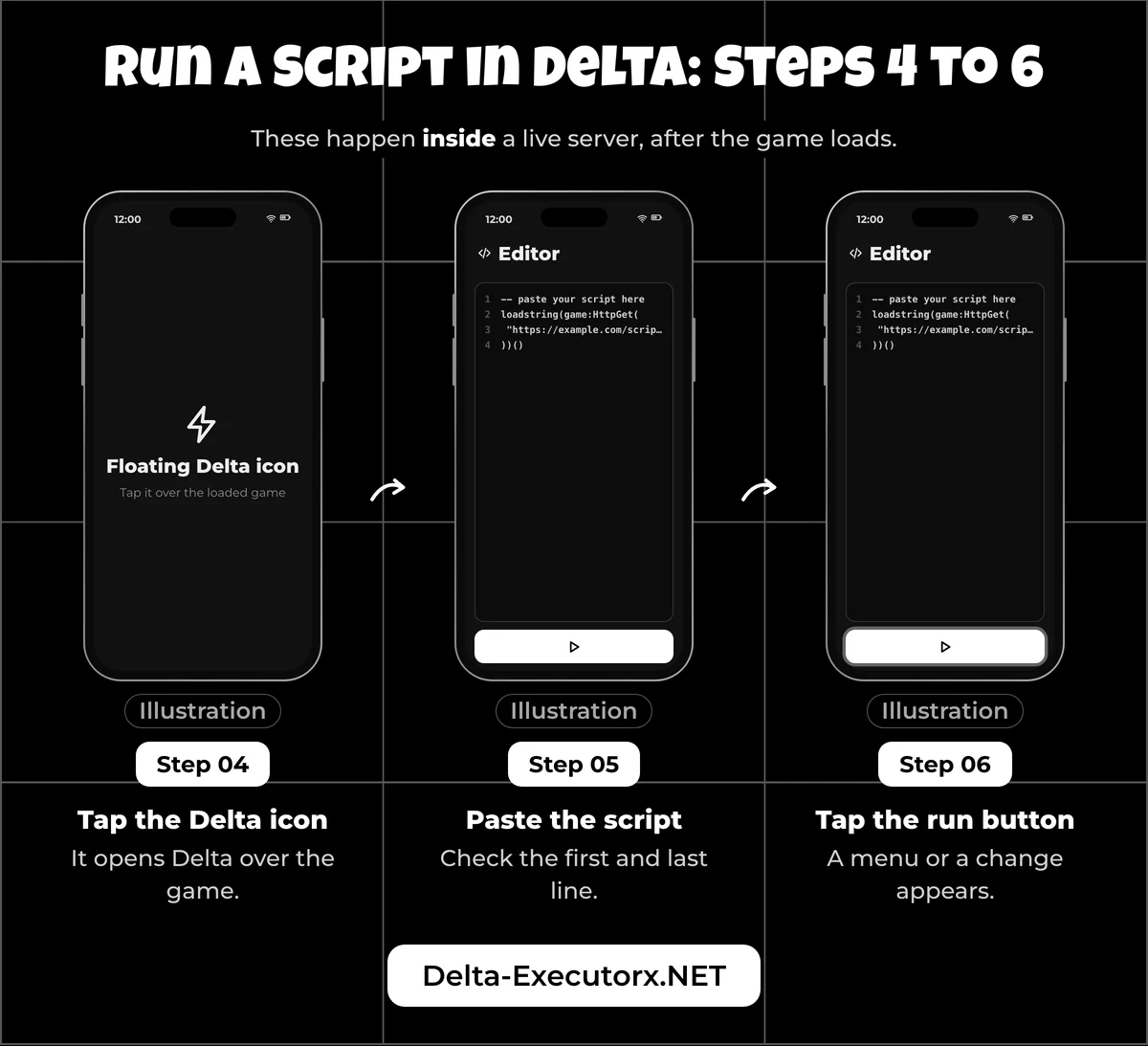
Once the game has loaded, tap the floating Delta icon to open the executor over the game. Delta then shows a column of small icons down the right side: a house for saved scripts, a gamepad for the editor, a cloud for Script Explorer, a gear for settings, >_ for Delta's console, and an exit button. If the icon never appears, Delta has not attached to Roblox, and that problem sits with the app rather than the script.
Step 5: Paste the Script Into the Editor
Tap the gamepad icon to open the editor, which has tabs named like "script1.lua" and a + button for a new tab. Long-press inside the editor and choose Paste, then scroll to the top and the bottom of the pasted text and compare both ends with the source.
Never retype quote marks by hand. Phone keyboards and some blogs turn straight quotes into curly ones (“ ”), and Lua strings need straight quotes, so one curly quote stops the whole script.
Step 6: Tap Execute and Watch the Game
Tap Execute, the run button under the editor next to Clear and Execute Clipboard, and look at the game. A script with a menu opens it on screen; a script without one changes something in the game instead, such as your speed or what you can see.
Before you blame a game script, run a line that needs no download: print(identifyexecutor()). Delta's docs say it prints the executor's name, its version and the architecture, so the console line (opened as shown under "How to Open the Roblox Developer Console" below) also tells you which Delta build you are on. If that line appears, Delta is attached and running code, and any later failure sits with the script.
What to Check Before Running a Script
Four things decide whether step 6 can work at all, and each one takes seconds to confirm. Run through them once per session, especially after Roblox has updated.
| Check | What "ready" looks like | If it fails |
|---|---|---|
| Delta opens | The app starts and reaches Roblox | Reinstall from the download page; on iPhone it is usually a certificate issue |
| Key is active | No key screen when you open the executor | Get a new free key or use your Premium key |
| Builds match | No "upgrade" message, no Error 280 on join | Wait for a matching Delta build |
| Alt account | You're signed in to an account you can lose | Switch accounts before you run anything |
The build check is the one that changes without warning. Delta's version numbers track Roblox's own builds, so when Roblox ships an update first, players report an "upgrade" message in Delta. Joining a game can then throw Roblox's Error 280, which Roblox defines as an out-of-date app. No script can fix that; the Delta upgrade error fix lists the Delta build that pairs with today's Roblox. Never edit Delta's version number to skip the message: the developer says Roblox can detect a modified Delta, which puts the account at risk.
That risk is the reason for the last row. Roblox's Community Standards ban "using or sharing exploits to help yourself or others gain an unfair advantage". Roblox's anti-cheat help page also warns that an account caught on a modified app more than once can move from a temporary suspension to a permanent ban. The developer itself recommends an alt and calls Delta "usually undetected", while admitting that can change during events or after Roblox updates its anti-cheat. The evidence on each action is laid out in Delta ban risk.
Delta Scripts on Android vs iPhone vs PC
The six steps never change, but the route into Delta does. This table lines up where the platforms part ways, since that is where a first attempt tends to stall.
| Android | iPhone and iPad | PC (Android emulator) | |
|---|---|---|---|
| Copying the script | Long-press, Select all, Copy | Same, but iOS may ask "Allow Paste" | Ctrl+C in Windows, paste inside the emulator |
| Where Delta comes from | The APK, which asks for storage access on first launch | An IPA or a Direct Install route, never the App Store | The Android APK inside BlueStacks, LDPlayer or MuMu |
| Where you open Roblox | Inside Delta, which is its own copy of the Roblox app | Delta's own Home Screen icon | Delta inside the emulator, not Roblox for Windows |
| Device-specific blocker | "Upgrade" message after a Roblox update | A certificate problem stops Delta opening | Roblox's "Emulator Detected" kick |
| Script on every join | Auto-execute folder | Auto-execute, which the developer says can be set up on an iPhone or iPad | Auto-execute inside the emulator |
The last row is optional. If you run the same script every session, auto-executing scripts in Delta shows where the folder lives on each platform, so the script loads without the paste step.
How to Use Delta Scripts on Android
On Android, you copy the script in your browser and paste it into Delta's editor over the running game. Android needs no signing or emulator, so it has the fewest extra steps.
Two details are specific to Android:
- Allow storage when Delta asks. The developer says Delta needs storage permission to save your key and your scripts, and for some features to work. Denying it can mean re-entering your key every time.
- Find the floating icon on top of the game. It sits over Roblox once the game loads.
How to Copy and Paste Roblox Scripts on Mobile
Half-pasted scripts start at the copy step. On the script page, tap its Copy button if it has one. If not, long-press any word in the script, tap Select all, then Copy.
In Delta's editor, long-press and tap Paste, then check both ends of the text against the source. If the end is missing, clear the editor with its Clear button and copy again rather than typing the missing part yourself, because one wrong character can stop the whole script. Many scripts are a single loader line that fetches the real code from a link, and what a loadstring is explains why those short lines are easy to copy but harder to judge.
How to Run Roblox Scripts on iPhone
You run scripts on iPhone with the same six steps as on Android. What differs is how Delta got onto the phone, where you open it, and a paste prompt iOS may show.
Delta is not on the App Store; the developer offers it as an IPA or through a Direct Install route, and installing Delta on iPhone walks through both. Once it is on the phone, the developer's iOS build is a full Roblox app with Delta added, so it installs next to the App Store Roblox app and you sign in to Roblox inside Delta. The App Store Roblox app can't run scripts, and updating it does not update Delta.
If Delta refuses to open, the developer says that is usually a certificate problem rather than a script problem. A sideloaded app may need trusting in Settings > General > VPN & Device Management, and the untrusted developer fix covers each alert. An app signed with a free Apple ID also stops opening after 7 days until you refresh it. Roblox itself needs iOS 14 or newer.
With Delta opening normally, start it from its own Home Screen icon, join a game, copy the script in Safari, then tap the floating Delta icon and paste. If iOS asks to allow pasting, tap Allow before you run it.
How to Stop the Allow Paste Pop-Up
The "Allow Paste" prompt appears because, since iOS 16, an iPhone or iPad can ask before an app reads what you copied without you pressing Paste yourself. To stop it, choose Allow under Paste from Other Apps, which offers Ask, Deny and Allow. On iOS 16.1 to 17 that switch sits at Settings > [app name]. On iOS 18 and newer, Apple groups per-app settings under Settings > Apps, so the path becomes Settings > Apps > [app name], where the developer's build shows up as Delta. The entry only appears after the app has asked to paste at least once, and Deny makes paste do nothing at all, which looks exactly like a broken script.
How to Use Roblox Scripts on iPad
The iPad route is identical to the iPhone one, and Roblox needs iPadOS 14 or newer. The larger screen gives the editor more room, which makes it easier to check both ends of a long script after you paste it.
How to Run Delta Executor Scripts on PC
On PC, Delta scripts run in the Android Delta app, loaded into BlueStacks, LDPlayer, MuMu or another Android emulator. Delta's FAQ calls its Windows build discontinued, so a native "Delta PC" .exe or .zip found online did not come from the developer.
The full emulator setup, from the APK download in your normal Windows browser to the first launch, lives in the guide to Delta Executor on PC. This section starts where that one ends: Delta installed in the emulator and your key active.
Before you rely on that setup, know one Roblox rule. Roblox announced on 7 August 2025 that players without creator permissions are kicked when it detects a third-party emulator. Its help page shows the message as "We don't allow emulators for accounts without place edit access." Only accounts with edit rights in that game are exempt, and Roblox says repeated detections can lead to a suspension or ban.
If the emulator gets you into a game, the PC run goes like this:
- Open Delta inside the emulator, not the Roblox app for Windows.
- Join a game in the emulator and wait until you can move.
- Copy the script in your Windows browser with Ctrl+C.
- Click the floating Delta icon and paste into the editor.
- Click the run button and check the game.
How to Paste a Script Into the Emulator
Windows and the emulator usually share one clipboard, so Ctrl+C in Windows and Ctrl+V inside Delta's editor normally does the job. When it doesn't, one of two things has happened:
- The previous text pastes instead. The emulator still holds an older copy. Copy the script again right before you paste.
- A long script arrives cut short. Copy it in two or three parts and paste them in order. If Delta then reports "Incomplete statement", the code is too long for the editor or has a syntax slip; use the hub's one-line loader version instead of the full pasted script.
If paste does nothing at all, restart the emulator and try again.
Ways to Run Scripts in Delta Executor
Delta can run a script in four ways: from text you paste into the editor, from whatever is on your clipboard, from a script saved in its Script Hub, or straight from a search in Script Explorer. Each suits a different moment, and they carry different levels of risk.
| Method | How it works | Best for | Risk |
|---|---|---|---|
| Paste into the editor | Copy, paste, run | A new script you want to read first | Low: you see the code before it runs |
| Run from the clipboard | Copy, then tap the clipboard-run button | Quick re-runs | You run text you never looked at |
| Script Hub | Save once, then run from the list | Scripts you use every session | A saved copy can go out of date |
| Script Explorer | Search, tap a result, run it | Finding a script for the game you are in | You may run code you never read |
Paste Into the Editor
Pasting is the method to use for anything new, because the code sits in front of you before it runs. If the lines look like nonsense, the explainer on what a Roblox script is shows how scripts are put together and what they can change on your screen.
Execute From the Clipboard
Delta has an Execute Clipboard button beside Execute, which runs whatever you copied last without putting it in the editor first. That speed comes at a cost: if you copied the wrong text, or only half the script, it runs anyway and you never see it.
Run a Saved Script From the Script Hub
Delta's built-in Script Hub keeps the scripts you save so you can run them again without pasting. In the docs, the house icon opens the saved list: tap Upload, give the script a title, paste the code and tap Add Script, and from then on each saved row has its own Execute and Delete buttons. Renaming, sorting, deleting and backing up saved scripts before a reinstall are all handled in the Delta script manager guide.
Run a Script From Script Explorer
Script Explorer is Delta's built-in script search, opened from the cloud icon. Search for a script or for the game you are in, tap a result, and Delta offers four choices: Execute Selected Script, Open Script in Editor, Save Selected Script and Copy to Clipboard. Pick Open Script in Editor first so you can read the code. Some results carry a "VERIFIED" badge, but the developer never says what it checks, so treat it as a label, not a safety promise.
Is a Roblox Script Safe to Run?
A Roblox script is only safe to run when you can read it and trust where it came from. It runs inside your signed-in Roblox session, so whatever it does happens on your account.
A loader line hides the real code behind a link, which makes the source matter even more than usual. Stop before you run anything that shows one of these signs:
- It asks for your password, cookie or login. No script needs them.
- The code is heavily scrambled and the source gives no reason you can check.
- Its key page wants you to install apps or turn off your antivirus.
Delta's own docs back this up: they warn that some scripts steal items or Robux and some log your IP address, and they tell players to test unsure scripts on a spare account. Keep Delta's Anti Scam setting on too, whatever a video tells you. For a fuller checklist, where to find safe Roblox scripts sorts script sites from safest to riskiest. Some scripts also promise server-side powers, and FE and server-side scripts explains why a "require" script won't work in Delta however it is pasted.
Why Isn't My Roblox Script Working?
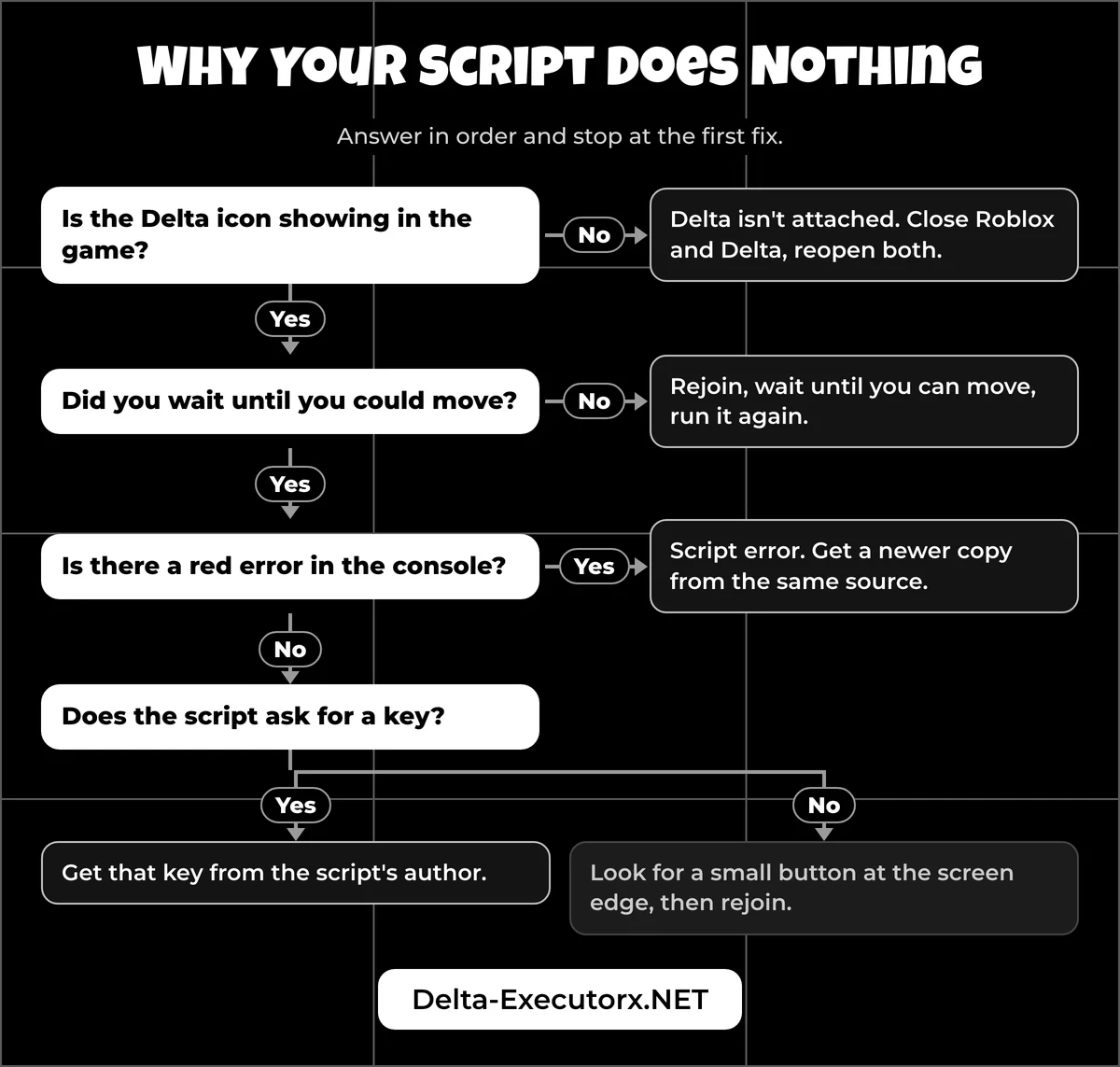
A Roblox script fails in Delta for one of a handful of reasons: it ran before the game loaded, Delta never attached, the script errored, it needs its own key, or a Roblox update is blocking Delta. Check the developer console before you change anything, because it tells you which of those you're facing.
| What you see | Likely cause | First fix |
|---|---|---|
| Nothing happens, or Roblox crashes | The script ran while the game was loading | Rejoin, wait until you can move, run it again |
| No Delta icon in the game | Delta isn't attached to Roblox | Close Roblox and Delta fully and reopen both |
| A red error in the console | The script is outdated or uses a function Delta lacks | Get a newer copy from the same source |
| Everything works except teleports | Delta's Verify Teleports setting blocks teleports started by scripts | Expected behaviour; the developer says to leave it on |
| The menu works, but speed, fly or jump do nothing | The game checks movement on its server (Server Side Authority) | Pick a different game; Delta's docs say server checks like these are beyond any executor |
| The script asks for a key | The script's own key system | Get that key from the script's author |
| It ran, but no menu shows | The menu is hidden or minimised | Look for a small button at the screen edge, then rejoin |
When the icon stays missing after a full restart, the cause is the app, and the Delta not injecting fix goes through each reason Delta fails to attach. The developer says Delta supports "most" scripts, not all, so the odd script that calls a function Delta lacks will never run however carefully it is pasted.
Key prompts are the next trap. A "No Key" tag on a script page means the script skips any extra key page; your Delta key is still required. Many popular hubs add their own key on top of Delta's, such as many behind Blox Fruits scripts in Delta and the Delta Executor Grow a Garden script hubs. Expect a second key page there, and never use a key-bypass site to dodge it.
Game updates break scripts too. A script that worked last week can stop after the game patches, which is why the Steal a Brainrot script status page carries a date. It is also why a 99 Nights in the Forest script may need a fresh copy after each update.
If Delta itself crashes every time, even in a fully loaded game, the developer takes bug and crash reports only on Delta's Discord. It asks for the steps, a recording, your device and OS version, and a screenshot of what a short identification script from its docs prints. Crashes caused by third-party scripts are out of scope there, so a script that errors goes back to its author.
Roblox and Delta Warning Messages
Some failures arrive as a message from Roblox or from Delta rather than as a script error, and the wording tells you who stopped the run. These are the texts as Roblox's help pages and Delta's docs print them.
| Message | Shown by | What it means | What to do |
|---|---|---|---|
| "Error Code 280: Your version of Roblox may be out of date." | Roblox | Your Delta build is older than the Roblox servers expect | Wait for the matching Delta build; never edit its version number |
| "We don't allow emulators for accounts without place edit access." | Roblox, PC emulators | The emulator was detected and you were kicked | Play on a real phone or tablet; no Delta setting changes this |
| "We noticed a modified version of Roblox was used on a device you recently played on." | Roblox | Roblox has flagged a modified app on your account | Treat it as a warning: Roblox says continued use may lead to more restrictions |
| A kick saying the script was blocked and detected as malicious | Delta's Anti Scam | Delta's scanner matched the script to a known harmful pattern | Delete the script; the developer says to keep Anti Scam on |
| A teleport warning in the console | Delta's Verify Teleports | A script tried to move you to another place | Normal; server hops and rejoins still work |
| An "upgrade" prompt, as players report it | Delta | Roblox updated before Delta did | Wait; scripts can't run until a matching build is out |
Most other red lines in the console come from the script itself, and the Delta script error fixes page decodes those one message at a time.
How to Open the Roblox Developer Console
On a Windows PC, press F9. On a phone, type /console in the game chat and send it, which works only if chat is turned on. Roblox's docs add a third route, Menu > Settings > Developer Console, but players report that option often doesn't appear on mobile, and inside an emulator /console is the safer choice.
Open the Client log, which lists what scripts on your device print and every error they throw. Roblox shows the Client view to anyone in the server, while the Server view is limited to the game's owner and editors, so in someone else's game the Client log is the only one you can read. The bar at the top counts errors and warnings, and tapping a count jumps to those lines. A red line means the script errored; your identifyexecutor line means Delta is working. Roblox explains each tab in its Developer Console documentation, and Delta's docs say its own built-in console shows the same errors; it sits behind the >_ icon.
How to Put a Script in a Roblox Game
To add a script to a game you are building, use Roblox Studio, not Delta. Roblox games are scripted in Luau, a language based on Lua 5.1.
In Studio, add a Script in the Explorer, for example under ServerScriptService, then double-click it to open the code in the editor. When you publish the game, its scripts are saved with it. If you would rather collect your own scripts behind one menu, making your own Roblox script hub shows how in Studio. The guide to running scripts without an executor separates what the console and Studio can really do from the myths.
FAQ
Do I need a key to run Delta scripts?
Yes. Delta always needs an active key: a free one from website tasks or a Premium key you buy to skip them.
Can you still script on Roblox on mobile?
Yes. The developer offers Delta for both Android and iOS, and it runs free with a task key. Free does not mean allowed, though: running scripts still breaks Roblox's rules.
How do you reset a Delta script?
Leave the game and rejoin, or close Roblox fully. A script you executed runs only in that game session.
Can I edit a script before I run it?
Yes. Change its text in the editor before you tap run, but only the settings the author says are safe to change, such as a true or false option at the top. Scrambled code usually breaks when edited.
Where do I find scripts for Delta?
The developer points to its built-in Script-Explorer, YouTube and public script sites. For a specific title, the page on Delta scripts for Roblox games covers MM2, Brookhaven, Rivals, Fisch and more.
Is there a script that works in every game?
Yes. Universal scripts are not tied to one game, and Infinite Yield and other universal scripts explains which of their features other players can see.
What is a script executor?
A script executor is an app that runs your own code inside a Roblox game you didn't make. Delta is one built for Android and iOS, and what a Roblox executor is explains how executors work and what separates them.
Conclusion
Running a script in Delta comes down to a ready app and good timing: an active key, a matching Delta build, a fully loaded game, and a clean paste of the whole script. When a script does nothing, the console tells you whether the fault is Delta or the script before you waste time on the wrong fix. Your next step is a script worth running, so learn how to get Roblox scripts for Delta from a source you can check, and test it on an alt account. Game-by-game script pages are collected in the Delta scripts hub.