
App Information
| App name | Delta Executor |
| Version | 2.745 |
| File | APK, 159.7 MB |
| Requires | Android 8.0 or newer, 64-bit |
| Category | Roblox script executor |
| Price | Free (a key is needed) |
| Developer | Lxnny and Team Delta |
| Build added | 3 November 2026 |
Delta Executor New Update
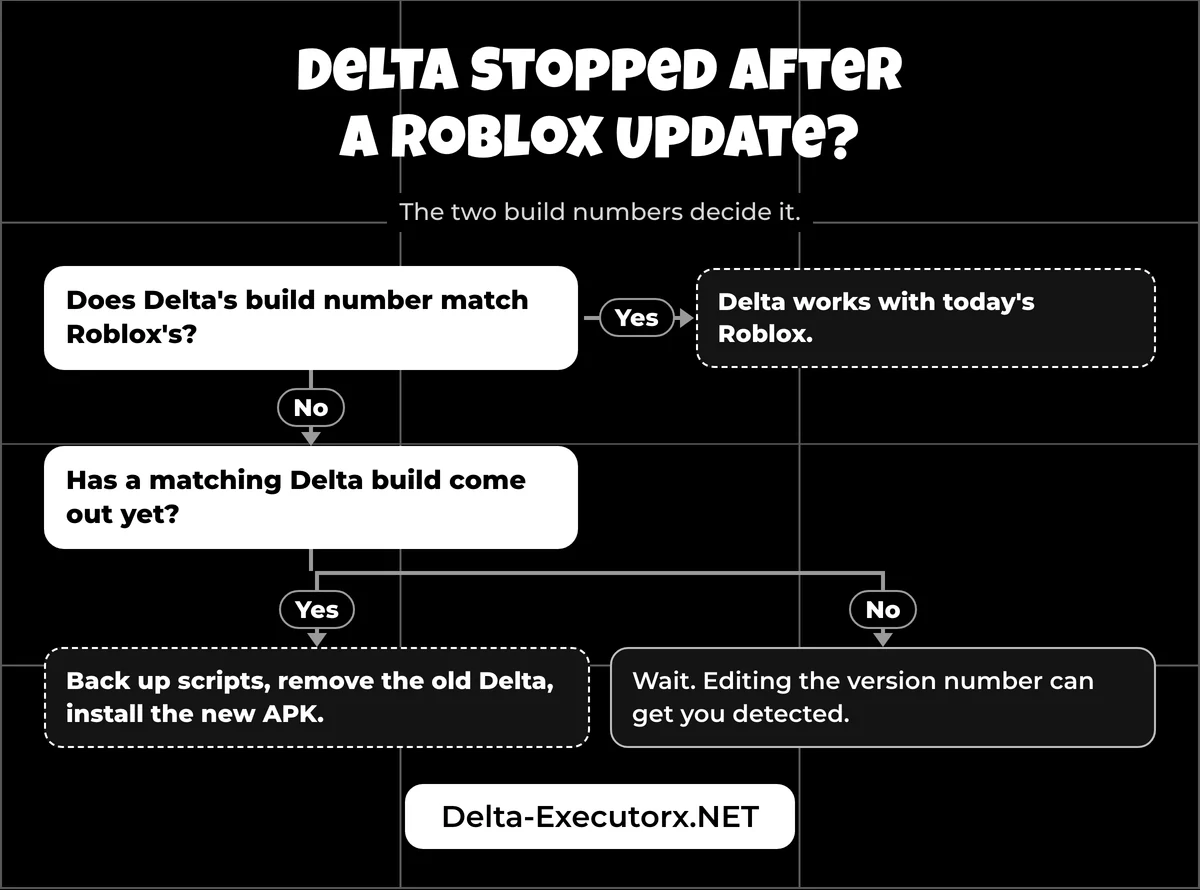
Delta Executor is on 2.745 for Android and 2.747 for iPhone. If the match column says no, expect an upgrade screen instead of a game.
| Device | Match? | Delta | Roblox today | Last checked |
|---|---|---|---|---|
| Android | No, three builds behind | 2.745 | 2.748.1527, from its Google Play page | 22 November 2026 |
| iPhone, iPad | No, one build behind | 2.747, the IPA from Delta's own site | 2.748.1526, from the App Store | 22 November 2026 |
| Windows | No, same as Android | 2.745 APK inside an emulator | 0.748.0.7481526 for Roblox's own Windows client; the emulator follows the Android number | 22 November 2026 |
Reinstalling the same file won't clear that screen; only a newer one does. The day-by-day Delta outage log shows how long past waits ran.
How to Update Delta Executor
- Wait for a match. Update only when both numbers in the Android line share the same middle digits. Files from 2023 to 2025 never will.
- Save your scripts and remove the old copy. Files from different sources can carry different signing keys, so clear out Delta fully before the new one goes on.
- Install the new APK with the steps in the next section.
- Open Delta and join one game. A fresh key may be needed, and a game that loads confirms it runs.
How to Install Delta Executor on Android
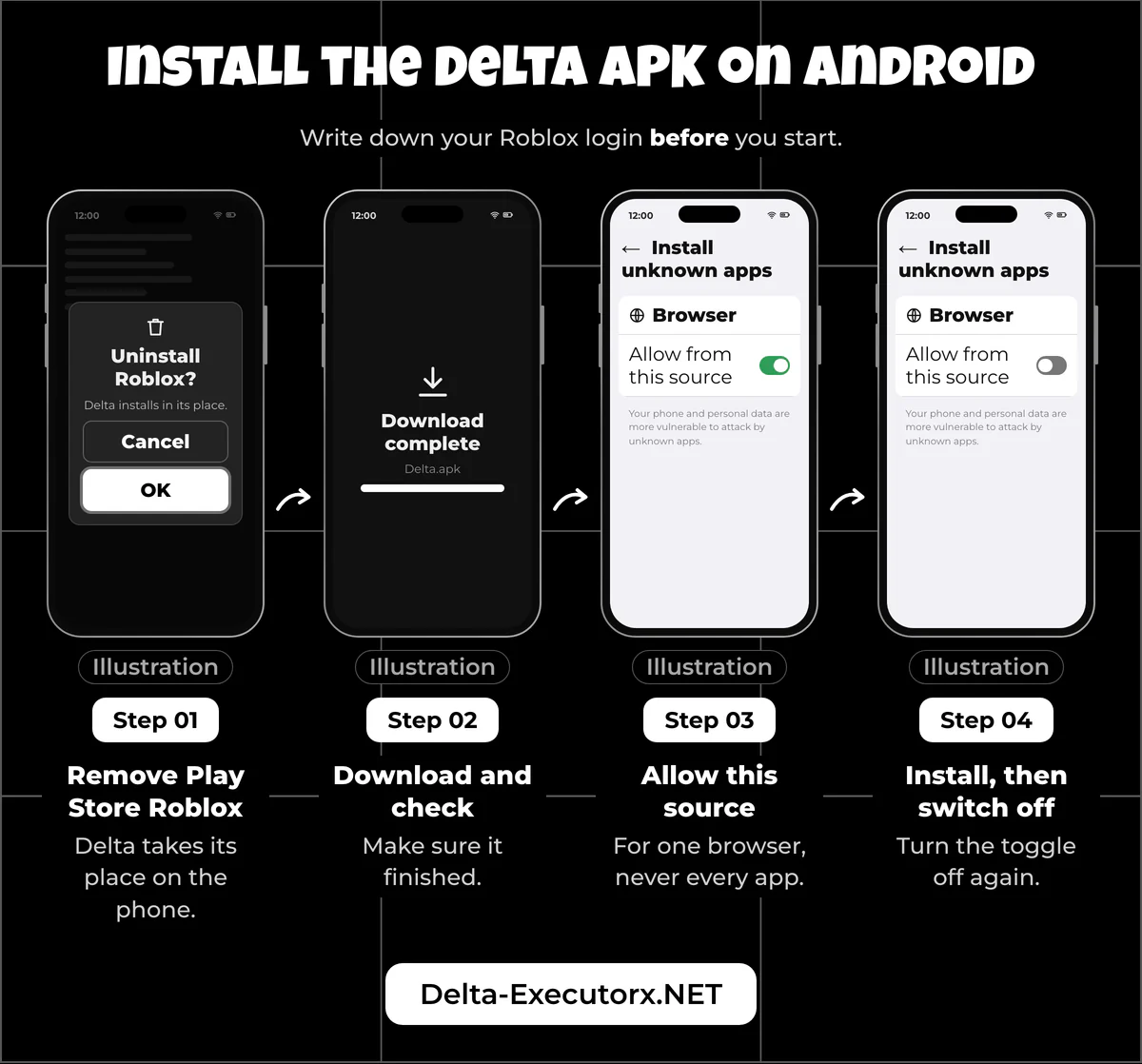
Delta isn't on the Play Store, so Android asks permission before it installs an app from your browser. The job takes eight steps, starting with your Roblox login.
- Write down your Roblox username and password. You sign in again inside Delta.
- Uninstall Play Store Roblox. Delta uses the same app ID, so both can't stay on the phone.
- Tap the download button above.
- Make sure the download finished. The full APK is 159.7 MB; a smaller file stopped early.
- Open the APK. When Android says your phone "currently isn't allowed to install unknown apps from this source," tap Settings and turn on Allow from this source for that one browser.
- Let Play Protect scan it if it offers to, then tap Install.
- Switch "Allow from this source" off again so nothing else gets in the same way later.
- Open Delta and sign in to Roblox, then delete the APK from your Downloads folder.
On a Samsung with One UI 6.1.1 or newer, Auto Blocker may stop step 5. Pause it under Settings > Security and privacy > Auto Blocker, and switch it back on once Delta is in. Phones in Brazil, Indonesia, Singapore and Thailand can also show Google's check for unverified developers, which can include a 24-hour wait.
Do You Need to Uninstall Roblox First?
Yes. Delta carries Roblox's own app ID, com.roblox.client, and Android keeps one app per ID. It will only replace an app with a file signed by the same key, and Delta and Roblox are signed with different ones. Once Play Store Roblox is gone, Delta is your Roblox app: you sign in and open every game through it.
Delta Executor System Requirements
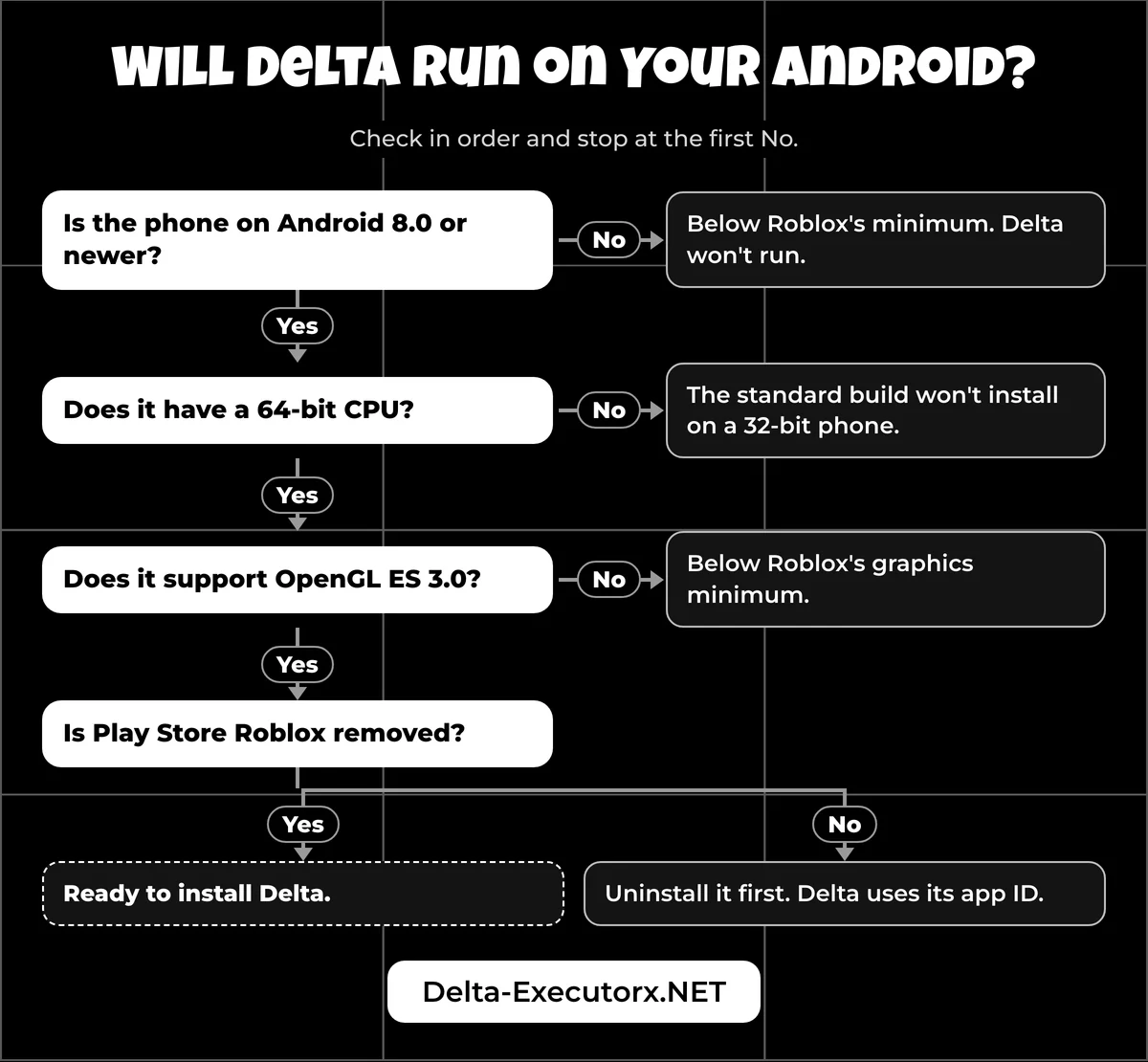
Delta Executor fits any 64-bit phone or tablet on Android 8.0 or newer whose graphics support OpenGL ES 3.0. The Android and graphics floors come from Roblox's list of supported devices, because Delta is built from the Roblox app. The 64-bit rule comes from the APK itself.
| Your device | Does the Delta APK fit? |
|---|---|
| 64-bit phone or tablet, Android 8.0 or newer | Yes, once Roblox is removed |
| 64-bit phone, Android 7.1 or older | No, below Roblox's minimum |
| 32-bit phone, any Android version | No, the APK holds 64-bit code only |
| Fire HD 8 (2022 or newer), Fire HD 10 (2023), Fire Max 11 | Not ruled out; remove the Appstore Roblox first |
| Fire HD 10 (2021), Fire 7 (2022) | Unknown; both are 32/64-bit hybrids |
| Fire tablets from 2018 and 2019, Fire HD 8 (2020) | No, they run 32-bit code |
| iPhone or iPad | No, Apple devices use an IPA file instead |
| Windows PC | Only inside an Android emulator |
| Xbox, PS4 or PS5 | No console version exists |
Find your version under Settings > About phone > Software information > Android version, though some brands name the last two screens differently. Leave room for the 159.7 MB file and the installed app, and use a connection of at least 4 Mb/s, the low end of Roblox's range.
How to Use Delta Executor
A fresh install needs three things before a script runs: a Roblox sign-in, a Delta key and a game that has finished loading.
Step 1: Sign In to Roblox Inside Delta
Use a spare Roblox account rather than your main one. When Delta asks for "All files access", turn on the switch Android shows, because Delta needs it to save your key and scripts.
Step 2: Get Your Free Delta Key
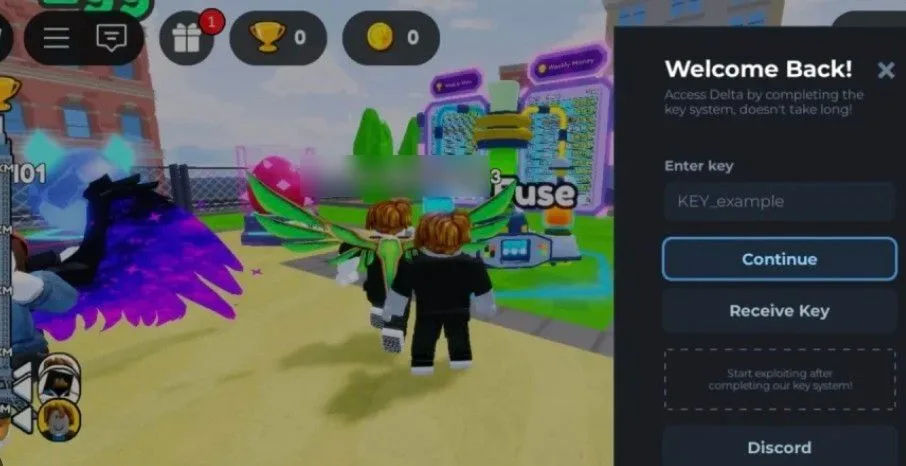
Tap Receive Key on Delta's key screen, finish the website tasks and paste the code back into the app. The Delta key walkthrough shows which buttons on those pages are real and which are ads.
Step 3: Join a Game and Run a Script
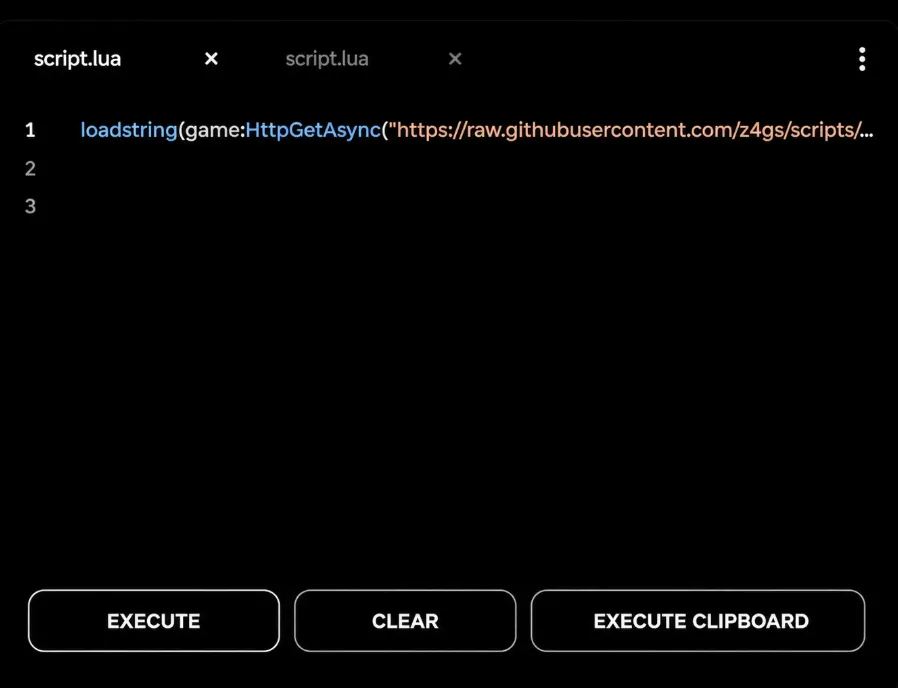
Wait until your character can move, open the Delta menu, paste a script and tap Execute. Each device has its own quirks, so running scripts in Delta covers Android, iPhone and PC one by one.
Delta Executor APK Features
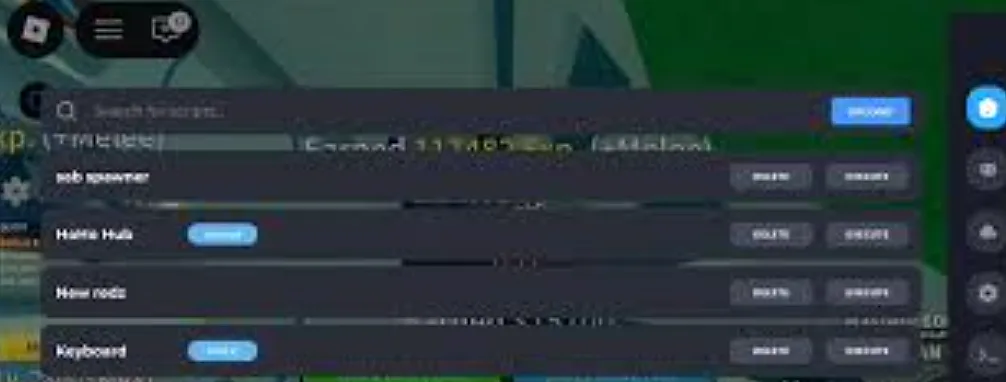
Delta Executor runs code and ships no cheats of its own. Auto farm, fly and ESP come from other players' code, for example the hubs listed for 99 Nights in the Forest.
| Feature | What it does |
|---|---|
| Editor | Tabs where you type or paste a script before running it |
| Script Explorer | Looks up scripts made for the game you joined |
| Saved list | Holds your favorites for another day |
| Auto execute | Runs chosen scripts each time Delta loads, from a folder on the phone |
| Console | A separate screen, opened with the >_ symbol |
The "VERIFIED" badge on some Script Explorer results is never explained by the developer, so don't read it as safe.
Is Delta Executor Safe?
Delta is risky for your Roblox account even when the file is clean. Roblox bans exploiting, and an alt account can be banned too, so sign in with one you could lose. What gets Delta users banned explains which actions draw attention.
Is Delta Executor a Virus?
No. Delta is a modified Roblox app that runs the scripts you paste. Compared with Play Store Roblox 2.745.1142, the Delta 2.745 APK adds one permission, All files access. It asks for no SMS, call log, location or accessibility access. A file check can't show what the app sends online, which is one more reason for a spare account.
Play Protect may scan the file, warn you, or refuse the install. If it calls the file harmful, stop, delete it and download again from the button above. Keep it switched on either way.
The scripts you paste carry their own risk, and safer places to find Roblox scripts lists what to check before you run one.
How to Spot a Fake Delta Download
Close the page if you see any of these:
- A survey, "mystery box" or prize stands between you and the file.
- The file is a password-protected .zip or a Windows .exe.
- The page tells you to switch off Play Protect before the file appears.
- The Delta number is higher than Roblox's own number that day.
- The page calls itself the developer's site, yet Delta's editor text names a different one.
What Is Delta Executor?
Delta Executor is a modified Roblox app for Android and iOS that lets you run your own Luau scripts inside Roblox games. Lxnny and Team Delta make it, a small group that uses handles and names no company. On Android it replaces Roblox, while on an iPhone it sits beside the App Store version as a separate app. "Delta X" is another name players use for this same app.
Is Delta Executor Free?
Yes. The app and its key cost nothing. Delta Premium is a paid key, and you don't need it to download the app or run a script.
Who Runs This Download Page?
An independent team that writes guides about Delta and is neither its developer nor part of Roblox. Our About page explains how downloads are kept current and how guides are written. If a file or fact here looks wrong, write to the team through the contact page and it gets corrected.
The developer keeps its own website, a Discord server with an invite ending in "deltax", and a Telegram channel. The button above opens a GitHub release file instead.
Fix Delta Executor Problems
Start with the line that matches what your screen shows. The full set is in the list of Delta fixes.
- "App not installed": a Roblox app left on the phone is the usual cause, and the app not installed fix matches every other message to its cause.
- "Untrusted Developer" on iPhone: the certificate needs your trust first, as shown in the iOS untrusted developer steps.
- Execute does nothing: the Delta not injecting test tells an app fault apart from a dead script.
- You have a computer: the APK runs in an emulator, and Delta on a PC picks the settings that work.
- You have an iPhone or iPad: signing and installing the IPA takes a different route, laid out in Delta for iOS.
FAQ
Is there a Delta Executor Mediafire link?
Not here. Anyone can re-upload a file to a sharing site, so you can't tell which build, or whose changed copy, you are getting.
Is there a Delta Executor mod APK?
Not from its developer. A "Delta mod" is a copy that someone else changed and signed again, and it can carry anything they added.
Is there a 32-bit Delta Executor?
Only copies nobody can trace. Builds called "Lite" and "Super Lite" circulate, but the developer's site doesn't list them, and this page offers the 64-bit APK only.
Is Delta Executor open source?
The code is closed. Its developer publishes no source, and the GitHub page behind the button holds only the APK and a one-line readme.
Is Delta Executor on other APK sites?
The developer points only to its own website, so a "Delta" on a third-party APK store is someone else's upload. Those stores also list the real Roblox app under the same app ID, so a search there can hand you plain Roblox instead.
Conclusion
Check the status table first, because a Delta build that trails Roblox keeps asking you to upgrade no matter how you install it. If the numbers match, remove Roblox, install the APK and sign in with a spare account. After that you need code to run, and getting Roblox scripts for Delta shows where players find it.