
Delta Executor Script Download Steps
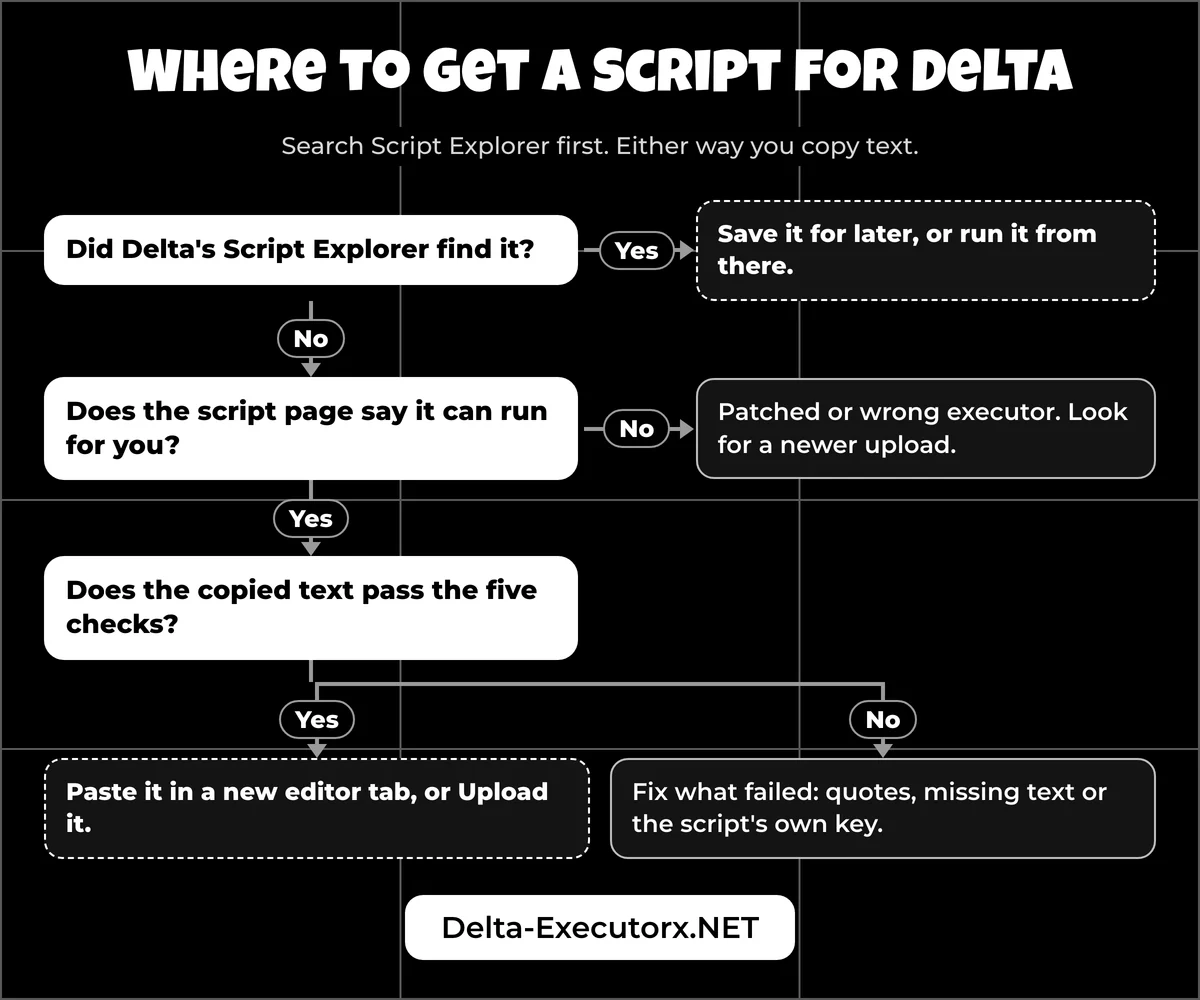
Search Delta's Script Explorer first, and only open a browser when that search comes up empty. Either way you end up copying text, so the job takes five steps.
If you came here for the executor itself rather than a script, or the app isn't on your phone yet, grab the latest Delta download first, then come back to these steps:
- Search Script Explorer. Open Delta, tap the cloud button and type the script name or the game you're playing.
- Open a public script page if nothing turns up. The developer's own docs point players to websites and communities dedicated to Roblox scripting. Before you pick one, the guide to finding safe Roblox scripts ranks those sources by risk.
- Read the script page, then copy the whole script. The labels for key, patched status and supported executors tell you if it can run for you at all. The script itself is usually a single loader line, sometimes a full block of code.
- Check the text you copied. The five checks further down catch the mistakes that stop a script before it runs.
- Save it or paste it in Delta. Use Upload to keep it for later, or a new editor tab to run it once.
Where to Paste a Roblox Script in Delta
The script goes into Delta, either into a new editor tab or into the Upload box. It never goes into Roblox's chat, settings or game menus, which is where many first-timers try to paste it. Once the text is in the editor, the step-by-step run guide for Delta walks through executing it on Android, iPhone and PC.
Writing scripts for a game you own is a different job done in Roblox Studio, which the page on running Roblox scripts without an executor explains.
What Is a Roblox Script File?
A Roblox script file is a plain-text file holding Luau code, usually named .lua or .txt. What you copied or downloaded tells you what to do next, and the table below decodes each case.
| What you see | What it is | What to do |
|---|---|---|
One line starting with loadstring( | A loader that fetches the real code from a raw link | Copy the entire line |
| Many lines of code | The full script, also called full source | Copy all of it, first line to last |
A .lua file | A plain-text script | Open it in a text or file app and copy the text |
A .luau, .txt or .lua.txt file | The same plain text under another ending; .luau is Luau's own extension | Treat it exactly like a .lua file |
| A "Raw" link | The script shown as text in your browser | Copy the text; nothing installs |
| A "Get Key" link inside the script | A key system belonging to the script hub | Finish it separately from your Delta key |
An .exe, .apk, .zip or password zip | Not a script at all | Don't open it |
Loadstring Line vs Full Script
A loader is one short line, while a full script is the whole program pasted out in the open. Both run the same way once they are in Delta. The loader looks like this (the link is a placeholder, not a real script):
loadstring(game:HttpGet("https://example.com/raw/your-script.txt"))()
When you run it, game:HttpGet downloads the text from the raw link and loadstring turns that text into code. Because the real code sits elsewhere, a loader can change after you copy it, and the explainer on what a loadstring does shows why that matters.
What Is a Raw Script Link?
A raw link is a web address that sends the script back as plain text, so your browser shows code instead of starting a download. Raw links from the common paste and code hosts answer as text/plain. That means opening a raw link on your phone is harmless by itself: copy the text, or save the page as a .txt file if you want to keep a copy.
Where Script Files Go on Android, iPhone and PC
Where a downloaded script lands depends on your device. On phones it goes to the browser's downloads, and you either copy the text into Delta or move the file into Delta's own folder. On a computer, Delta runs inside an Android emulator, so the script has to end up inside the emulator.
| Device | Where the download lands | Delta's own folder | Simplest way into Delta |
|---|---|---|---|
| Android | Chrome: tap More (top right), then Downloads; or open the Files app | Internal storage > Delta | Copy the text, then paste or Upload |
| iPhone and iPad | Files > Browse > iCloud Drive > Downloads | Files > On My iPhone (or iPad) > Delta | Copy the text, then paste or Upload |
| PC or laptop | The Windows Downloads folder | Inside the emulator, not in Windows | Paste in the emulator |
How to Get Delta Scripts on Android
On Android, open the downloaded .txt or .lua file in any text or file app, copy everything and paste it into Delta. If you'd rather keep the file itself, move it from Downloads into the Delta folder in internal storage. The only written clue to the exact spot is a 2023 plugin guide credited to the Delta team. It says saved-script files belong in workspace/d_android_script_dir, so check that subfolder first.
That folder only fills up if Delta can write to your storage. On first launch the app asks for storage permission "to save your key, scripts and for certain features to function," so tap Allow when the prompt appears.
How to Get Roblox Scripts on iPhone and iPad
Files downloaded in Safari land in the Files app: open the Browse tab, tap iCloud Drive, then Downloads. Apple lists the same path in its guide to finding downloads on iPhone.
Delta's iOS app has file sharing switched on, so its own folder should appear under Files > On My iPhone (or On My iPad) > Delta. Move the script there, or open it and copy the text; iPad works the same way. If Delta isn't installed on your iPhone yet, the Delta iOS install guide covers signing the app first.
How to Get Roblox Scripts on PC or Laptop
On a PC or laptop, copy the script text in Windows and paste it into Delta inside your Android emulator. The developer discontinued the Windows version, so the emulator is the only route, and the Delta for PC setup shows how to get the app running there.
Moving a file is less certain: BlueStacks imports Windows files through Media Manager > "Import From Windows", but that tool is built for photos and videos. BlueStacks doesn't say whether it accepts .txt or .lua files, so pasting the text stays the safer route. Keep in mind that since August 2025 Roblox can kick players it detects on a third-party emulator, a limit worth weighing in the emulator comparison for Delta before you pick one.
Can't Find a Downloaded Script?
"I have the script, but where is it?" comes up again and again under script tutorial videos. Work through these checks in order:
- Ask the browser first. In Chrome on Android, tap More (top right), then Downloads; Google's own help also points to the Files app. In Safari on iPhone or iPad, tap the Downloads button next to the search field.
- Search the file name, not the extension. Some libraries save scripts as
.txtor.lua.txt, so a search for ".lua" can miss them. Type part of the script's name in your file app instead. - Look in the right Files tab on iPhone. Downloads sit under iCloud Drive, while Delta's own folder sits under On My iPhone (or On My iPad).
- Check storage permission if Delta's folder is missing. If you refused Delta's first-launch prompt, allow storage in the app's permission settings, open Delta once, then look again.
How to Get Delta Scripts Without Downloading a File
You can skip files completely. Delta gives you three ways to bring a script in: Script Explorer, the Upload box and a blank editor tab.
Script Explorer. Tap a search result and Delta offers four options: Execute Selected Script, Open Script in Editor, Save Selected Script and Copy to Clipboard. Some results show a "VERIFIED" badge and a view count, but the developer doesn't say what the badge means, so read the script's page before trusting it.
Upload. Tap Upload and an "Enter Details" box asks for a Title and the Script text; tap Add Script to save it. Saved scripts then appear in a list with Delete and Execute buttons. The box takes pasted text, with no option to pick a file from storage.
Editor tab. Tap the plus button to open a new tab, named like "script1.lua", and paste the code there to run it straight away.
Renaming, sorting and backing up what you saved is a job of its own, covered in the Delta script manager guide. If you want a saved script to start every time Delta loads, the walkthrough to auto execute scripts in Delta sets that up on each device.
How to Get Roblox Scripts to Work
A copied script can fail because of the text itself, before Delta runs a single line. Run these five checks on what you copied:
| Check | What to look for | Fix |
|---|---|---|
| Straight quotes | " or ', never curly “ ” from blogs or phone keyboards | Retype the quotes |
| Code, not a link | The script itself, not the address of the page it sits on | Go back and copy the code box |
| Complete text | A loader starts with loadstring( and ends with () | Copy again; one missing bracket breaks it |
| Script key | A "Get Key" step inside the script | Finish the hub's own key; a "Keyless" label never means Delta needs no key |
| Current version | The game updated since the script was posted | Look for a newer version from the script's author |
Game scripts can stop working after the game changes, and the fix is usually an updated version from the script's author. A hub's own key is also separate from the one you earn through the Delta key system.
If the text passes every check and still fails, make sure your Delta build matches Roblox, as the upgrade error fix explains, and open the Roblox developer console (F9, or /console in chat) to read the error. A 404 there means the raw link behind a loader was taken down, moved or mistyped; if you copied it whole, only a new link from the author will help. The Delta script error fixes match each message to the step that solves it.
How to Read a Script Page Before Copying
A script library page tells you whether a script can run for you before you copy a single line, as long as you read the labels together with the description. Uploaders set most of these labels themselves, so treat them as hints rather than promises.
| Label or field | What it tells you | What to do |
|---|---|---|
| Key or Keyless | Whether the script's own hub asks for a key | If neither label shows, expect a key step anyway |
| Patched | The script was flagged as broken by a game update | Skip it and look for a newer upload |
| Universal or a game name | Whether it runs in any game or in one game only | Join that game before you execute |
| Free or Paid | Paid entries sell access, usually through a hub key | Never pay through a survey or a password zip |
| Description notes | Executors the author says it won't run on, plus the feature list | Look for Delta or "mobile" in the notes |
| Player reports | Recent works or broken votes, on libraries that collect them | Trust a recent report over a big view count |
Out of the 20 newest entries in one large script library's public feed, 11 had neither the key nor the keyless flag set and 3 were paid. One opened its description by naming PC executors it would not run on. All 20 were single loader lines, which is why step 3 asks you to read the page before you copy.
Which Roblox Script Downloads Are Fake?
Any "free Roblox script download" that hands you an .exe, .apk or password zip, or sends you through a survey, is not giving you a script.
- "Turn off your antivirus" advice. Copying text needs no security change, so a page that asks for one is hiding something.
- Ad-link gates. Script links in video descriptions often route through pages that make you click ads before showing the link. Skip them and search Script Explorer instead.
- Server-side, dupe and spawner offers. The developer calls these scams, and the explainer on FE and server-side scripts shows why a phone executor can't do what they promise.
- Account and IP theft. The developer also warns that some scripts steal inventory or Robux and some log your IP, and suggests testing unsure scripts on a scrap account.
- Anti Scam turned off. Keep Delta's Anti Scam on; the developer says to ignore any YouTuber who tells you to disable it.
Using an executor also breaks the Roblox Terms of Use. Alt accounts can be banned too, which the breakdown of Delta ban risk covers action by action.
FAQ
Do you need to download anything for Roblox scripts?
No. Delta is the only app you need, and scripts arrive as text through Script Explorer, Upload or a pasted editor tab.
Is there a Roblox script app to download?
No separate app is needed. The "Delta Executor" script apps on Google Play come from unrelated developers and carry ads, while the developer distributes Delta from its own site. Delta has no built-in script maker either; to build your own menu, the Delta Executor script maker guide uses Roblox Studio and AI instead.
Are Roblox scripts free to download?
Most scripts on public script pages are free text you can copy. A few are sold as paid hub access, and any page that wants a survey first is a red flag.
Is it safe to download Roblox scripts?
The text itself installs nothing, but the code can still steal items or Robux when it runs. Stick to sources you trust and test new scripts on an alt account.
Will a PC script work on my phone?
Usually, because Delta on a computer is the same Android app running in an emulator, so the code doesn't care which device you hold. The exception is a script whose description says it needs a PC executor, so read those notes before you copy.
Can you get Delta scripts on Mac or Chromebook?
The developer only makes Android and iOS versions, so a Mac or Chromebook needs a workaround. The guide to Delta on Mac and Chromebook lists which ones work.
Conclusion
Getting a Roblox script for Delta comes down to text: search Script Explorer first, copy the whole loader or code when you go elsewhere, and check it before you paste. Your next step is to pick a script for the game you play, and the list of Delta scripts for popular Roblox games flags which ones ban cheaters and which scripts are fake. Universal tools like the Roblox Infinite Yield script work in most games while you decide.