
Why Is Delta Executor Not Working?
Delta usually stops working because Roblox shipped a new build and your copy of Delta was made for the previous one. When the versions match, the fault sits with Roblox's servers, your phone, the key or the script instead.
Start with the version numbers, because they settle the most common case in seconds:
Version check (22 October 2026): Roblox for Android 2.744.1081, Delta for Android 2.743. Roblox for iPhone 2.743.1136, Delta for iPhone 2.743. If the Delta number is lower than the Roblox number on your platform, expect an "upgrade" prompt until a matching Delta build ships.
Delta's version number follows the Roblox build it was made for, so a lower Delta number means a gap you can't close from your phone. When the numbers line up again, the latest Delta APK on our home page is the build to install, and everything below assumes you are on it.
Why Do All Roblox Executors Stop Working at Once?
Every mobile executor is built against a specific Roblox build, so when Roblox ships a new one, the old builds stop matching it on the same day. Roblox's own Error 280 text points the same way, saying your version "may be out of date". The pattern is the same for every tool, which is why how a Roblox executor works matters more here than which executor you picked.
How to Fix Delta Executor
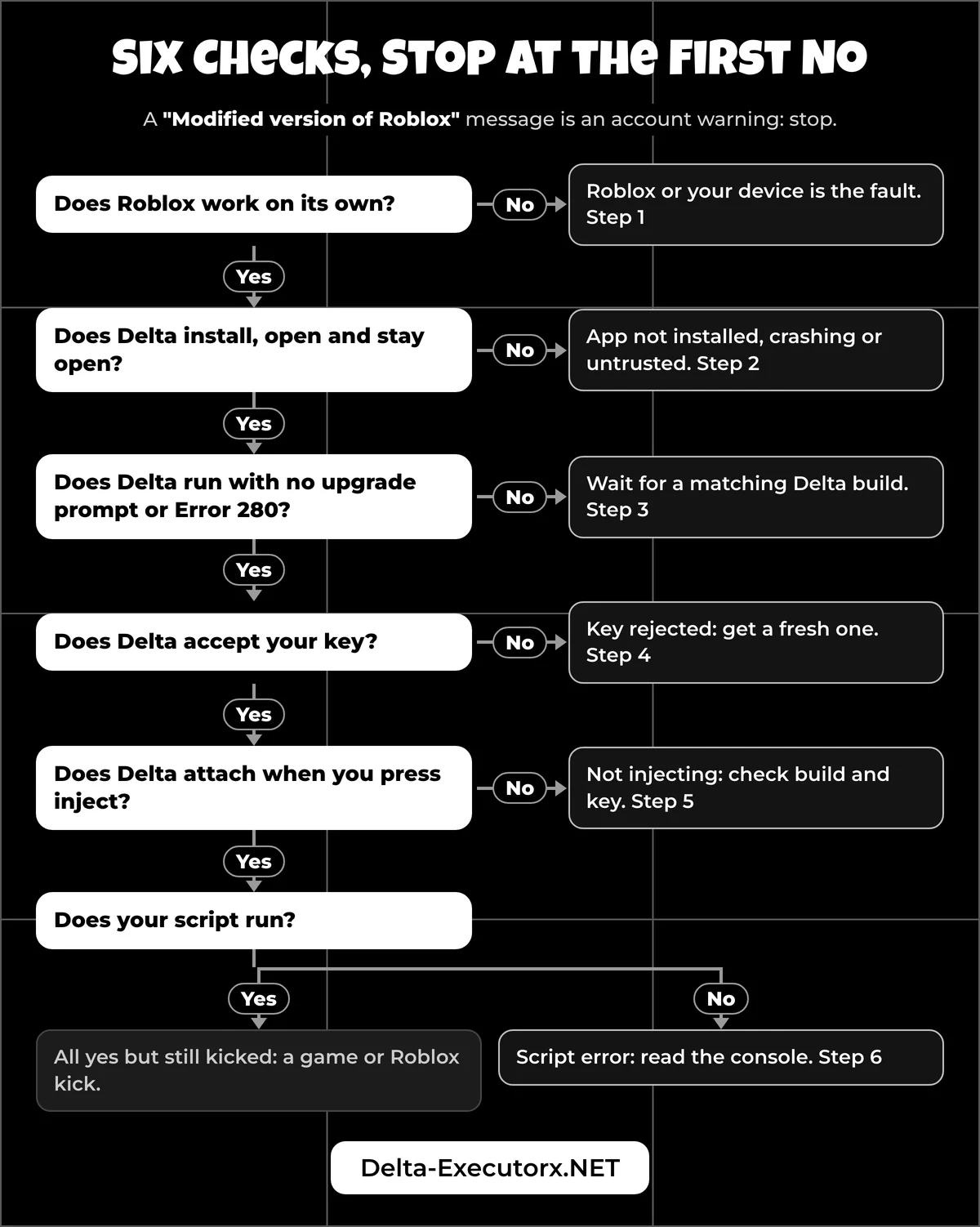
To fix Delta Executor, answer these six questions in order and stop at the first "no". Each "no" points to one step below.
- Does Roblox work on its own, without Delta?
- Does Delta install, open and stay open?
- Does Delta run with no upgrade prompt or Error 280?
- Does Delta accept your key?
- Does Delta attach when you press inject?
- Does your script run?
No message on screen, only a symptom? This short table skips you to the right step:
| What happens | Where the fault is | Go to |
|---|---|---|
| Roblox fails without Delta too | Roblox or your device | Step 1 |
| Closes when opened, crashes mid-game, black screen, no floating button | The Delta app on your device | Step 2 |
| Inject does nothing | Build mismatch or inactive key | Step 5 |
| Script does nothing, or the script hub is empty | The script or the hub | Step 6 |
| Kicked from a game with a code | Roblox or the game | Error codes section |
If a message did appear, match its words in the next table instead.
Delta Executor Error Messages and Their Causes
Each error message comes from one of five places: Android's installer, iOS, Roblox, Delta's key screen or the script. Who shows it tells you who can fix it, so look up the words you see before you try anything.
Wording can differ slightly between phones and builds, but the cause behind each message stays the same.
| Message you see | Shown by | Cause | Go to |
|---|---|---|---|
| "App not installed" or "invalid package" | Android | An old Delta or the official Roblox app is still installed and signed with a different key | Step 2 |
| "There was a problem parsing the package" or "Parse error" | Android | The phone runs an Android version below the app's minimum, or the download broke | Step 2 |
| "App not compatible with device" | Android | The phone is 32-bit, and Delta doesn't support 32-bit devices yet | Step 2 |
| "Unknown source" blocked | Android | The browser or file app you opened the APK from has no install permission yet | Step 2 |
| "Insufficient storage" | Android | Not enough free space for the install | Step 2 |
| "Untrusted Enterprise Developer" or "Developer not trusted" | iOS | You haven't trusted the signing certificate yet | Step 2 |
| "Unable to Verify App" with "An internet connection is required to verify..." | iOS | No connection, Apple's check server failing, or your device is blocked from that certificate | Step 2 |
| "Integrity not verified", "Delta is no longer available", or a crash at launch | iOS | The certificate that signed Delta was revoked | Step 2 |
| "upgrade", "out of date", or Error 280 | Roblox inside Delta | Roblox updated and your Delta build is older | Step 3 |
| "Invalid license key" | Delta key screen | Key expired or typed wrong | Step 4 |
| "Key too long" | Delta key screen | You pasted the link or a script, not the key | Step 4 |
| "Failed to cache link" | Delta key screen | A network or app cache problem on the key link | Step 4 |
| "Line 1..." | Script, in the console | A typo in the loadstring or the script | Step 6 |
| "Error 404" | Script, in the console | The script was taken down or moved, or the link has a typo | Step 6 |
| "WaitForChild...", "FindFirstChild..." or "Attempted to call a nil value" | Script, in the console | The script is outdated or was written for another game | Step 6 |
| "Incomplete statement" | Script, in the console | The pasted code is too long for the editor, or has a syntax error | Step 6 |
| Delta closes the moment you execute | Delta | A bug in that build: update or reinstall Delta, then report it | Report section |
Two rows deserve a closer look. "App not installed" usually clears once the old copy is gone, because Android installs an app over an existing one only when both carry the same signing certificate, as its app signing documentation explains. "Unable to Verify App" isn't always caused by your phone. When it spread among developers on 10 March 2026, an Apple engineer confirmed on Apple's developer forums that ppq.apple.com, a service iOS uses to check app certificates, "was having problems", and the alert stopped once Apple fixed it.
Anything not in this table that kicks you out of a game is a Roblox code, listed further down.
Step 1: Check Whether Roblox Itself Is Down
Close Delta and open plain Roblox. On Android, Delta takes the place of the Roblox app, so run this test on another phone, a tablet or a computer. If plain Roblox fails as well, the problem is Roblox, and nothing you change in Delta will fix it.
To confirm, open Roblox's status page and look at the Mobile App, Games and Game Join components. A problem listed there means you wait. If the status page is clear but the Roblox app still won't open, use Roblox's own basic fixes. Close and reopen it, Force Stop it in app settings, restart the phone, check that the date and time are correct, then clear its data or reinstall.
If Roblox works and Delta fails for many players at the same moment, Delta itself may be down. The "Status" link on the developer's site leads to no status page, so Delta's Discord announcements are where outage news appears. The full walkthrough for telling an outage from a local fault is in the guide on whether Delta Executor is down.
Once Roblox opens normally on its own, move on to the Delta app.
Step 2: Make Sure Delta Installs and Opens
If Delta won't install, the APK doesn't fit your phone, clashes with an app already on it, or Android blocks it. If it installs but closes or never appears, the fault is the Delta app on your device.
"App Not Installed" on Android
Android shows this message when it refuses the file, and two causes come up far more than any others. The first is the signing clash from the error table, which is why the Android install begins with uninstalling the official Roblox app. The second is chip type: "App not compatible with device" means the phone is 32-bit and Delta needs a 64-bit one. Plain Roblox, by contrast, can still run on some 32-bit phones and tablets.
Roblox also needs Android 8.0 or newer, so an older phone fails no matter which Delta build you try. In Brazil, Indonesia, Singapore and Thailand, Android has added extra checks for apps from unverified developers since 30 September 2026, and Google's one-time "advanced flow" still lets you install them. Each exact Android message has its own cause, and the fix for "App not installed" matches them one by one.
Delta Crashing or Not Opening
If Delta closes as soon as it opens, crashes mid-game or shows no floating button, compare its version with Roblox's in the box above before anything else. When the versions match and it still crashes, work through the fixes for Delta crashing or not opening, which run from most to least likely.
A stubborn crash often traces back to leftovers from an old install. Removing the old Delta, the APK file it left in your downloads and any second Roblox copy before reinstalling is the cleanest reset. The steps to get rid of Delta Executor completely cover each folder.
Delta Not Opening on iPhone
iOS blocks sideloaded apps until you trust their developer under Settings, General, VPN & Device Management, and Apple's support page adds that the phone must be online at that moment to check the certificate. Most iPhone problems come down to certificates, which Delta doesn't handle for you, so this check comes before any other iPhone fix.
The alert's wording narrows it down. "Untrusted" means you skipped the trust step, while "Integrity not verified" or "no longer available" means the certificate was revoked, and trusting it again won't help; only a reinstall signed with a working certificate will.
The Untrusted Developer fix for iPhone walks through the trust steps and the alerts that trusting can't clear. With Delta open and stable, the next question is whether it asks you to upgrade.
Step 3: Fix the Upgrade Error and Error 280
If Delta asks you to upgrade or Roblox shows Error 280, Roblox has almost certainly updated and your Delta build is older. The only real fix is a Delta build that matches the new Roblox version.
Roblox's message for Error 280 reads: "Your version of Roblox may be out of date. Please update Roblox and try again." Delta's own prompt says "upgrade" or "Delta is out of date". On Android you may also see Roblox's older "Your version of Roblox is out of date and will not work properly". All of them mean the same gap shown in the version box.
Following that prompt to Google Play can't help, because Play only offers the official Roblox app, which is signed with a different certificate from Delta.
Three popular fixes fail here, each for a clear reason:
- Clearing the cache leaves the Delta version exactly where it was.
- Getting a new key has nothing to do with this message.
- Offloading Delta on iPhone keeps the app's data and reinstalls the same app when you tap the icon, so the same version returns.
A matching build counts only once its file shows up on the developer's own download page. Then Android users replace the old APK, and iPhone users install the new IPA through the same route they used before, as laid out in the Delta Executor iOS install guide. The Roblox upgrade error and Error 280 fix has the platform steps and what to do while you wait.
No upgrade prompt on screen means the build is fine, which points to the key next.
Step 4: Check Your Delta Key
A rejected key has usually expired, because free Delta keys are temporary. Get a fresh one by finishing the tasks on the key website again; a Premium key skips the tasks but is still a key.
Three other key problems look like bugs but aren't. If Delta says the key is too long, you pasted the link rather than the key itself. If the key page reports "Failed to cache link", the first fixes are clearing the app's cache and switching from Wi-Fi to mobile data or back. If Delta accepted its key and a script then asks for another one, that second prompt belongs to the script hub's own key system, which Delta doesn't control.
A key takes about 15 seconds to get, but there is no published lifetime for a free key. The page on how long a Delta key lasts shows how to check the time left, and every on-screen key error is matched to its fix in the Delta key troubleshooter.
With a valid key, Delta should attach to the game.
Step 5: Fix Delta Not Injecting
When pressing inject does nothing, the most likely cause is a Delta build that doesn't match Roblox. If the build matches, an inactive key is the next thing to rule out.
If the version box shows an older build, go back to step 3, because nothing here will help. If your build matches and the key is active, the cause lies elsewhere, from opening the wrong Roblox app to a script that fails silently. Each one is sorted by symptom in the guide to Delta not injecting or attaching.
Delta attaching to the game proves the executor itself works, which leaves only the script.
Step 6: Test Whether the Script Works
Run a one-line test script that only prints a word. If the word prints, Delta is working, and the script you wanted is broken, outdated or blocked by the game.
The steps to run scripts in Delta show where to paste and execute the test on Android, iPhone and PC. Three results trip players up after that:
- "Infinite yield possible" is a Roblox warning that a script has waited more than 5 seconds for a part of the game that hasn't appeared. It is not a crash, and the script may still run. It is unrelated to the admin script that shares the name, described in our list of universal Roblox scripts like Infinite Yield.
- An empty script hub happens in some games with no stated cause. Try again after the next Delta build.
- "Alt account detected" or a similar kick comes from the game's own code. Delta can't fix it, because the game decided to remove you.
A script that fails usually prints its reason where you can't see it. Open the developer console to see which error you hit. There are three ways in: F9 on a keyboard, typing /console in the game chat, or the in-game Roblox menu under Settings, then Developer Console, then Open. Delta also has its own console. Match the error line to the script rows in the table above. Two of them, "Line 1..." and "Error 404", usually point at the loadstring line that fetches the script, and the Delta script error fixes show who can repair each one.
Roblox Error Codes and Kick Messages
Some codes, like Error 280, are version problems you can fix. Others are account warnings, and the only fix for those is to stop using Delta on that account.
The meanings below come from Roblox's Help Center, including its Anti-cheat Messages page:
| Code or message | What Roblox says it means | What to do |
|---|---|---|
| Error 280 | Your Roblox version may be out of date | Step 3 |
| Error 268, "kicked due to unexpected client behavior" | Usually a network problem, or an app such as antivirus conflicting with Roblox | Try another connection. If 268 only appears while Delta runs, the cause is on Delta's side, not your Wi-Fi |
| "Roblox has timed out" | Roblox asks you to restart the client | Restart Roblox |
| "Emulator Detected" | Emulators aren't allowed for accounts without place edit access | See the PC section |
| "Rooted or Jailbroken Device Detected" | Rooted devices aren't allowed | Stop. Delta can't change this |
| "Virtual machine detected" | Roblox spotted a virtual machine | Stop. Delta can't change this |
| "Modified version of Roblox" | A modified Roblox was used on your device; more use "may lead to more account restrictions" | Stop. This is an account warning, not a bug |
| A custom game kick, such as "alt account detected" | The game's own code removed you | Leave that game |
Using any executor breaks Roblox's rules, and Roblox says it may suspend an account for these messages or ban it permanently "if it happens repeatedly", alt accounts included. How Roblox spots modified apps, and what each action risks, is covered in our breakdown of Delta Executor ban risk.
How to Fix Delta Executor on PC
There is no Windows Delta to fix, because the Windows version is discontinued. PC players run the Android app inside an emulator, and since 7 August 2025 Roblox kicks players without edit access to a game when it detects one.
That kick shows up as "Emulator Detected" in the table above, and no Delta update changes it. BlueStacks, LD Player and MuMu Player remain the usual emulator options, and the Delta Executor for PC guide explains the setup and its limits. If you still want to try, the comparison of the best emulator for Delta Executor scores each one on the Roblox kick.
Be wary of Windows files that claim to be Delta: with no Windows build in existence, any such file is a fake and often carries malware.
Which Fixes Make Delta Executor Worse?
A VPN, a "fixer" download, a "new build" you can't trace or switching off phone protection can't change your Roblox or Delta build, and some of these put your phone or account at risk.
- Turning off Play Protect or antivirus. Play Protect checks apps from outside Google Play, and Google recommends keeping it on. Advice to switch it off is a classic sign of a fake download.
- A VPN for the upgrade prompt or Error 280. The prompt is about versions, not your connection.
- Pressing "Not now" on the update prompt. Skipping it doesn't change your Roblox or Delta build.
- "Universal Roblox executor fixer" downloads. No such tool comes from Roblox or the developer, and these files show the same red flags as fake Delta files: content lockers, surveys and password-protected zips.
- Editing the version number to skip the prompt. Spoofing the iOS IPA version is detected and risks a ban, and Roblox can detect a modified Delta APK.
- "No key" or Windows builds of Delta. Every real Delta build needs a key, as our look at Delta keyless claims explains, and Windows Delta is discontinued.
- A "new Delta" named after the latest Roblox build. Video titles and mirror sites often copy Roblox's fresh build number before any matching Delta exists, so a "new" version can be advertised while the real download still offers the previous build.
If none of the six steps found the fault, you may have hit a real Delta bug.
How to Report a Delta Executor Bug
Report it in Delta's Discord server, either in a support forum post or to a staff member, because bug reports are taken nowhere else. A useful report includes six things:
- The steps that make the problem happen
- Evidence: screenshots, a screen recording, the error message or a console log
- Whether it happens every time
- Your Delta version, which should be the latest
- Confirmation that you already reinstalled Delta
- Your device model and Android or iOS version
Key, install, certificate and script problems don't count as bugs, so a report about one of those gets ignored; steps 2, 4 and 6 above cover them instead. To find the real server and avoid fake invites, use our page on the Delta Executor Discord.
FAQ
Which Delta errors put my account at risk?
Only Roblox's anti-cheat messages, such as "Modified version of Roblox", "Emulator Detected" or "Rooted or Jailbroken Device Detected". The upgrade prompt, Error 280, a rejected key and a failed inject are problems with the app, not actions against your account.
How long does Delta take to update after Roblox?
There is no published update timeline. The new build is out when Delta's Discord announces it and its file appears on the developer's download page; until then, reinstalling only brings back the old one.
Can an older Delta version avoid the upgrade error?
No. An older Delta build matches an even older Roblox build, so the gap gets wider, not smaller.
Why did Delta work yesterday but not today?
Roblox most likely shipped a new build overnight. Compare the two version numbers; if Delta's is lower, you are waiting for a matching build.
Why is my Delta file showing as an error?
Play Protect checks apps from outside Google Play and can warn about, disable or remove one it finds harmful. Check where your file came from instead of turning the protection off.
Should I uninstall Roblox before installing Delta?
On Android, yes. The install starts with removing the official Roblox app, and the same advice applies when an APK won't install. Delete any old Delta APK file from your downloads as well.
Does reinstalling Delta fix the upgrade error?
Only if you reinstall a newer build that matches Roblox. Reinstalling the same file brings back the same version and the same prompt.
Conclusion
Most "not working" cases come down to a Delta build older than Roblox, and the version check settles that in seconds. When the numbers match, the six steps narrow the fault to Roblox, the install, the key or the script. After every Roblox update, run them again from step 1, and back up your saved Delta scripts before any reinstall so you don't lose them. Each single-symptom guide is also listed in the Delta Executor fixes hub.