

App Information
| IPA version | 2.745 |
| File size | 142.3 MB |
| Works on | iPhone and iPad, iOS 14 or newer |
| Signing | Needed before it opens (signer app, Sideloadly or SideStore) |
| Checked | 13 November 2026 |
One IPA serves both iPhone and iPad. It arrives unsigned, the way the developer ships it, so iOS refuses it until a signer app or a computer tool adds a certificate. Phones on Android take the Delta Executor APK instead, because an IPA opens only on Apple devices.
Which iPhones Can Run Delta Executor?
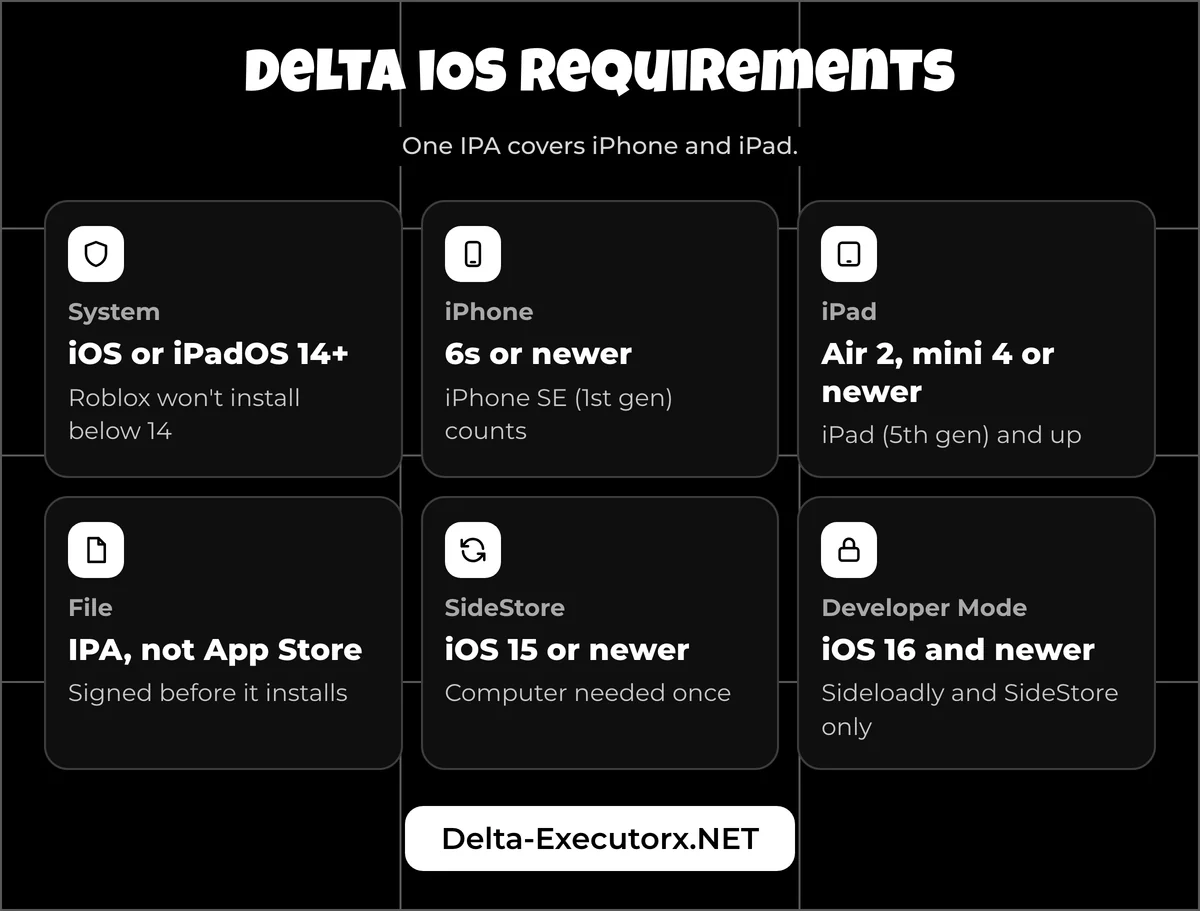
Any iPhone or iPad on iOS or iPadOS 14 or newer can install Delta, which means an iPhone 6s, iPhone SE (1st gen) or anything later. That floor comes from two places: Roblox's own iOS app requires iOS 14, and the Delta IPA declares iOS 14.0 as its minimum. The checklist under the install methods covers storage, internet and Apple ID needs.
Plenty of guides still claim iOS 12 works. It can't, because Roblox itself won't install below iOS 14. Find your iPhone's last iOS version in the table below.
| iOS version | Roblox installs? | iPhones that stop here | Install note |
|---|---|---|---|
| 12 to 13 | No | iPhone 5s, 6 (last iOS 12) | Below Roblox's iOS 14 minimum |
| 14 to 15 | Yes | iPhone 6s, 7, SE (1st gen) (last iOS 15) | No Developer Mode step |
| 16 | Yes | iPhone 8, X | Computer methods need Developer Mode |
| 17 to 18 | Yes | iPhone XS, XR (last iOS 18) | From iOS 18 the trust button reads "Allow & Restart" |
| 26 | Yes | None (every iOS 26 iPhone can move to iOS 27) | Same as iOS 18 |
| 27 (released 14 Sep 2026) | Roblox says new iOS versions "may not immediately be supported" | None yet (runs on iPhone 11 and newer, SE 2nd gen and newer) | Same as iOS 18 |
To see which version you have, open Settings > General > About and read the iOS Version line. iPads follow the same rule: iPadOS 14 or newer, starting with the iPad Air 2, iPad mini 4 and iPad (5th gen).
Delta Executor iOS Install Methods
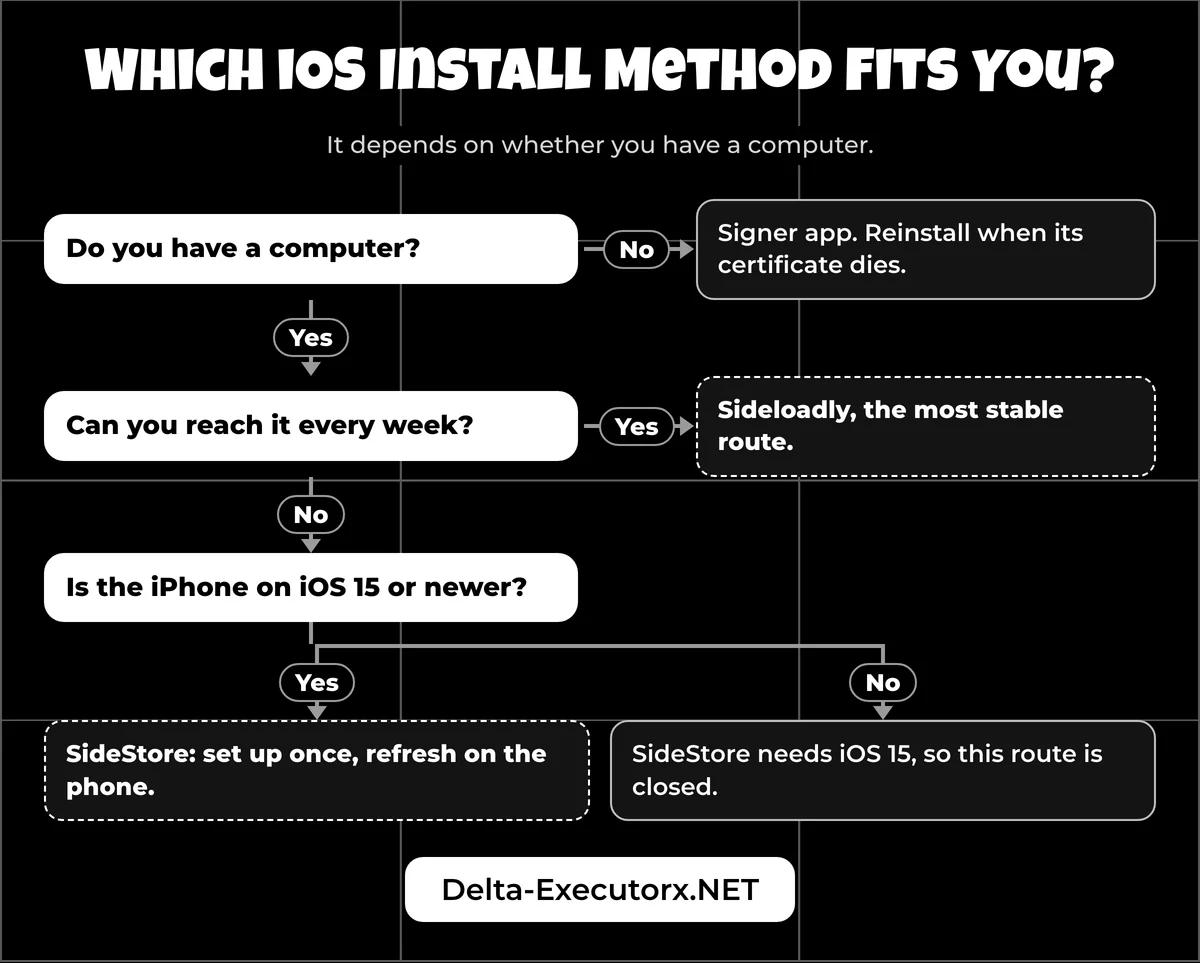
There are four ways to get Delta onto an iPhone, and the right one depends on whether you have a computer. With no computer, use a signer app. With a Windows PC or Mac, Sideloadly or SideStore signs the app under your own Apple ID, so nobody else's certificate can break it.
| Method | Computer? | Your Apple ID? | How long it lasts | What breaks it | Watch out for |
|---|---|---|---|---|---|
| 1. Signer app (KSign type) | No | No | Until the signer's certificate is revoked | A revoked or blacklisted certificate | The developer warns that the majority of KSign copies "may be outdated, revoked or blacklisted"; its no-PC guide adds a DNS profile |
| 2. Sideloadly | Yes, each time | Yes | 7 days on a free Apple ID | The 7-day limit | Developer Mode on iOS 16+; child Apple IDs fail; Windows needs the web (not Microsoft Store) iTunes and iCloud |
| 3. SideStore (set up with iloader) | Once | Yes | 7 days, refreshed on the phone | A missed refresh or an expired pairing file | iOS 15 or newer only; the LocalDevVPN app must be connected for every refresh |
| Direct Install (not recommended) | No | No | Until Apple revokes the certificate | A revoked certificate | Third-party site, older build, borrowed certificate |
The developer lists all four routes and puts iOS problems down to certificates, since Delta "does not handle certificate configuration or signing". Pick by what you have:
- No computer at all? Use Method 1, and expect to reinstall whenever the certificate dies.
- A computer you can reach every week? Use Sideloadly, which signs with your own Apple ID so no one else's certificate can break it.
- A computer only once? Set up SideStore, then refresh Delta from the phone.
Before You Install Delta on iPhone
Check these before you start, because each one can stop the install partway:
- iOS or iPadOS 14 or newer (15 or newer for SideStore).
- Free space for the 142.3 MB download plus the installed app.
- A working internet connection for the trust step, with no DNS blocker or VPN filtering Apple's servers.
- A phone passcode set, since Developer Mode and SideStore both ask for it.
- For computer routes: an adult Apple ID with two-factor codes reaching you, ideally a spare account.
- For computer routes: a free slot, because a free Apple ID holds 3 sideloaded apps at once and SideStore counts as one of them.
- Any scripts you saved in an older Delta copied out, in case you have to delete it first.
Install Delta Executor on iOS Without a Computer
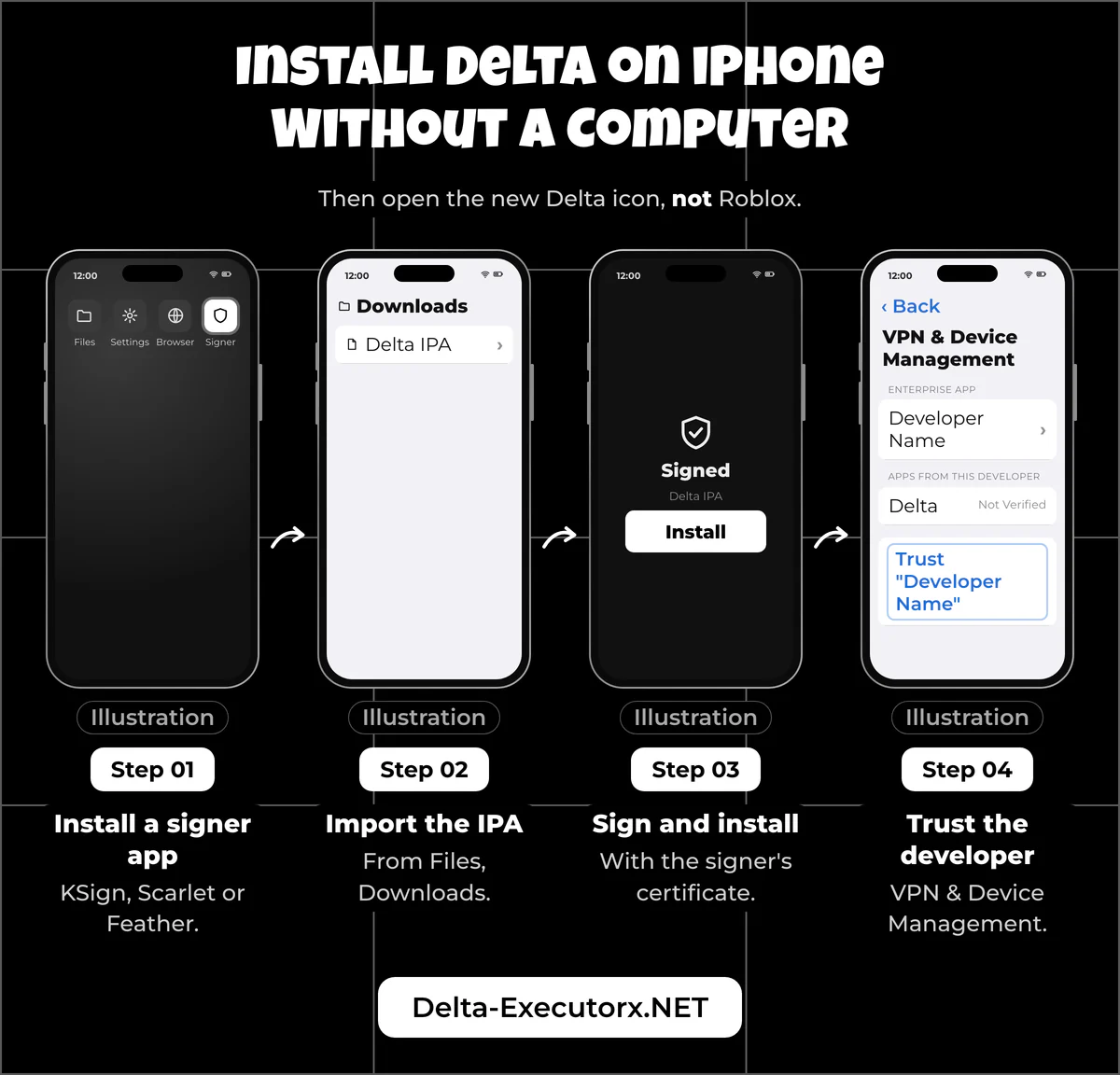
Without a computer, you sign the Delta IPA on the phone with a signer app such as KSign, the route the developer's own no-PC guide uses. The app then runs on the signer's certificate, so it keeps working until Apple revokes that certificate.
Step 1: Install a Signer App
Install KSign, the signer the developer's guide names, on your iPhone. Its own GitHub page says KSign is built on Feather and exists because ESign "is no longer in service", so skip any tutorial still sending you to ESign. Scarlet and Feather do the same job of importing and signing an IPA.
A signer can't sign anything without a certificate: a .p12 file, its password and a matching .mobileprovision. No-computer guides hand out a shared one that crowds of strangers sign with at the same time, and that kind of mass reuse is what gets a certificate revoked. If a guide asks you to add a profile first, read the DNS warning below before you agree.
Step 2: Import the Delta IPA
Open the signer and import the IPA you saved from the download box; it sits in the Files app under Downloads. If the name ends in ".ipa.zip", Safari added an extra extension, so long-press the file in Files, choose Rename and delete the ".zip" part. Check that the version matches 2.745 before you continue. Then sign it with the signer's certificate and tap install; a separate Delta icon appears on your home screen.
Step 3: Trust the Developer
Open Settings, then General, then VPN & Device Management, pick the developer name and press Trust. On iOS 18 and newer the button says "Allow & Restart". You must be online, because iOS checks the developer with Apple's ppq.apple.com server. Tap it offline and the entry stays "Not Verified" until you reconnect and press Verify App.
On iOS 14 the menu has an older name, so look under Settings > General for an item containing "Device Management". Apple describes this screen on its page about installing custom enterprise apps on iPhone. When the alert still won't clear, the Delta Executor iOS untrusted developer fix walks through each iPhone message that Trust can and can't solve.
Step 4: Open Delta
Tap the new Delta icon, not the Roblox icon. The first launch asks for a key; the free Delta key tasks cover it.
How to Remove a DNS Profile on iPhone
The developer's no-computer guide starts by installing a DNS profile from a third-party site, and that step deserves caution. A DNS profile sends your iPhone's web lookups through whoever made it, for every app on the phone, not just Delta. The ones bundled with signer guides are sold as "anti-revoke": they try to stop the phone from reaching Apple's certificate checks. The same blocking can leave a freshly trusted app stuck on "Unable to Verify". Apple's own trust page says a firewall must let the phone reach ppq.apple.com, which is the kind of traffic these profiles get in the way of.
If you installed one you don't trust, open the same VPN & Device Management screen, pick the profile, choose Delete Profile and enter your passcode.
How to Install Delta Executor iOS With a PC
With a Windows PC or Mac, Sideloadly signs the Delta IPA with your own Apple ID, so no stranger's certificate can be revoked under you. You need the computer, the IPA from the download box and an adult Apple ID, ideally a spare one rather than your main account. Running Delta on the Mac itself is a different question, answered in Delta on a Mac.
- Install Sideloadly on the computer. On Windows, first swap any Microsoft Store copies of iTunes and iCloud for Apple's web installers, which Sideloadly requires.
- Connect the iPhone and accept "Trust This Computer" on the phone.
- Add the Delta IPA to Sideloadly by dragging the file onto its window.
- Enter your Apple ID, then the two-factor code it asks for.
- Click Start and wait for the install to finish.
- Trust the developer on the iPhone, exactly as in Step 3 above.
- Turn on Developer Mode on iOS 16 and newer, then open Delta.
How to Turn On Developer Mode
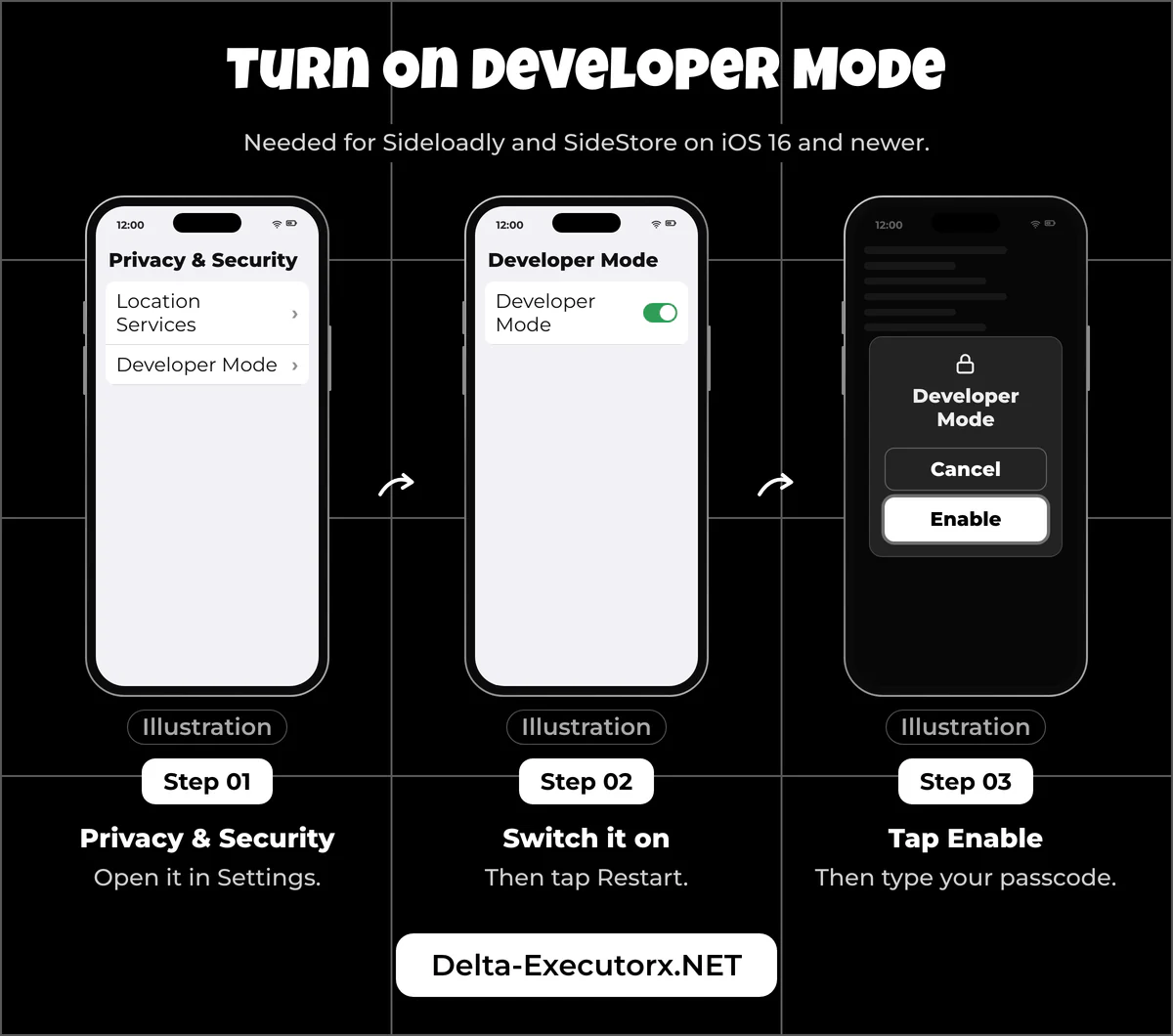
Open Settings > Privacy & Security > Developer Mode, switch it on, tap Restart, then tap Enable and type your passcode. The switch only appears after the iPhone has been connected to a computer, and only the Sideloadly and SideStore routes need it because they sign with your Apple ID.
Sideloadly Errors and Fixes
Sideloadly errors on a Delta install each have one fix; the first four below are quoted from Sideloadly's FAQ.
| Sideloadly says | What it means | Fix |
|---|---|---|
| "This device has reached the maximum number of installed apps using a free developer profile" | 3 apps already signed with your free Apple ID | Delete one sideloaded app, then sign again |
| "Your maximum App ID limit has been reached. You may create up to 10 App IDs every 7 days." | Too many new app IDs this week | Wait a few days or use another Apple ID |
| "Call to lockdownd_client_new_with_handshake failed: LOCKDOWN_E_INVALID_HOST_ID" | The phone never trusted this computer | Tap Trust on the iPhone, then restart the computer with the phone still plugged in |
| "Failed to obtain anisette: 500 INTERNAL SERVER ERROR" | A temporary server problem on the login side | Retry later, or pick Local Anisette in Advanced Settings |
| "This Apple account cannot be used for development with Xcode" | A child account in Family Sharing, or an unsupported region | Use an adult Apple ID |
| Developer Mode Required | iOS 16 or newer blocks the app until the switch is on | Follow the Developer Mode steps above |
Why Delta Stops Opening After 7 Days
A free Apple ID gives each sideloaded app 7 days and allows 3 sideloaded apps at a time. Once the week is up, Delta won't open until you sign it again with Sideloadly. SideStore removes most of that chore: you set it up once with iloader on Windows, macOS or Linux. From then on you refresh Delta on the phone itself before the 7 days run out.
A signer-app install has no such clock, but it dies the day its certificate is revoked. Either way, the re-signing steps and the crash causes that come after launch are in why Delta won't open or keeps crashing. If Delta opens but games or scripts still fail, the six yes or no Delta tests narrow it down.
Can You Run Delta iOS on PC?
No. Windows can't run iPhone apps, so a computer's only job here is signing the IPA for your phone, as in the Sideloadly steps above. Playing Roblox with Delta on the computer screen itself means the Android build in an emulator, set out in Delta on a Windows PC.
Delta Executor iOS Direct Install
The "Direct Install (UNOFFICIAL)" button on the developer's iOS page does not install the developer's file. It hands you over to an outside site, and that site's download has four problems:
- An older build. It has installed Delta builds older than the IPA on this page, which explains many "out of date" errors after a direct install. The site swaps its file from time to time, so the gap moves from week to week.
- A borrowed certificate. The file is signed with an enterprise certificate issued to an unrelated company. Those certificates are meant for a company's own staff apps, and Apple revokes misused ones, which is why direct installs suddenly stop opening.
- Extra code. The app contains code that is not in the developer's own build, and nothing explains what it does.
- Ads and lockers. The developer warns this route "may result in advertisements appearing during gameplay", and the site adds task lockers and a pop-up pushing a VPN app.
That is why this page never links to the direct-install file. If a direct-install copy is already on your phone, replace it with the clean IPA signed through Method 1 or Sideloadly.
How to Use Delta Executor on iOS
Open the new Delta app, not App Store Roblox, and log in to Roblox from inside it. The IPA carries its own copy of Roblox under a separate app ID, so the two icons sit side by side and Delta never needs the other one.
Paste the key you earned in Step 4; if Delta rejects it, Delta key error messages decode the wording. With the key active, pick something from the Delta scripts hub and follow the copy, paste and Execute steps, which also cover the iPhone "Allow Paste" prompt.
How to Update Delta Executor on iOS
To update Delta on iOS, install the newer Delta IPA with the same method you used the first time. Updating Roblox in the App Store changes nothing, because Delta carries its own copy of Roblox inside the IPA.
Signed with the same certificate, the new build installs over the old one. After a method switch, say from a signer to Sideloadly, iOS may refuse until you remove Delta from the iPhone, and deleting it wipes anything stored inside the app. Back up the scripts you care about first; the guide to saving scripts in Delta shows where they live.
That bundled copy is why an "upgrade" message appears right after a Roblox update, and the Delta upgrade error explainer shows how to read it. Delta posts its build news in its Discord server, and the Delta Executor Discord link page shows which invite is the real one.
Is Delta Executor Safe on iPhone?
On iPhone the risk sits in the signing, not the app. Signed under your own Apple ID with Sideloadly or SideStore, the IPA needs no shared certificate, DNS profile or paid "unblacklist" tool. The no-computer route trades that for a stranger's certificate, which can be revoked without warning. Scripts are a separate risk, ranked in where safer Roblox scripts come from.
FAQ
Is Delta Executor on the App Store?
No. An App Store search for "delta executor" shows only unrelated apps from other sellers, such as "Delta Game Emulator", a retro console emulator with no link to Roblox. Any App Store app claiming to be Delta Executor is a lookalike.
Can I install the Delta APK on an iPhone?
No. APK files are Android packages, and iOS can't open them. iPhone and iPad need the IPA from the download box.
Do I need to jailbreak my iPhone for Delta?
No. Every install method puts a signed app on a normal iPhone. Roblox also flags jailbroken devices with its own anti-cheat message, which only adds to the account risks in can Delta get you banned.
Does Delta Executor work on iPad?
Yes, on iPadOS 14 or newer, from the iPad Air 2, iPad mini 4 and iPad (5th gen) onward. The same IPA covers iPhone and iPad.
Does Delta work on iPhone 5s or iPhone 6?
No. Both phones stop at iOS 12, and Roblox needs iOS 14, so neither Roblox nor Delta can install.
Can I install Delta on a school iPad?
Only if whoever manages it allows it. A school or company can push a restriction profile that turns off trust for new enterprise developers. VPN & Device Management then shows "Trusting enterprise apps not allowed", which no signer or setting on the device can get around.
Conclusion
Delta on iPhone comes down to the right IPA and a signing method that fits you: a signer app with no computer, Sideloadly or SideStore with one. Skip the direct-install shortcut, and reinstall the new IPA whenever Roblox moves ahead. If Delta stops opening later, the live Delta and Roblox build numbers show whether a new IPA is the fix.