
What You Need Before Getting a Delta Key
You need a copy of Delta that opens, matches the current Roblox build and is allowed to save files. The key tasks can't repair any of these, so checking them first saves a wasted run through the ads.
| Check | Why it matters | If it fails |
|---|---|---|
| Delta opens and shows its key screen | No key screen means no key link to copy | On iPhone, see the certificate note in the iOS section; on Android, the fix for Delta not opening covers crashes at launch |
| Delta is on the newest build (2.743 on Android, 2.743 on iOS) | An older Delta shows an "upgrade" prompt inside Roblox, and a fresh key does nothing for it | Update Delta, or wait for the build that matches Roblox, then get the key |
| Storage access allowed (Android) | Delta keeps the key it receives in storage, as Step 1 explains | Turn the permission back on in Android's app settings |
| One stable network for the whole run | Switching networks is the first fix the developer lists for blank pages and stalled tasks | Finish the tasks on the same Wi-Fi or data connection you started on |
How to Get a Delta Key on Android
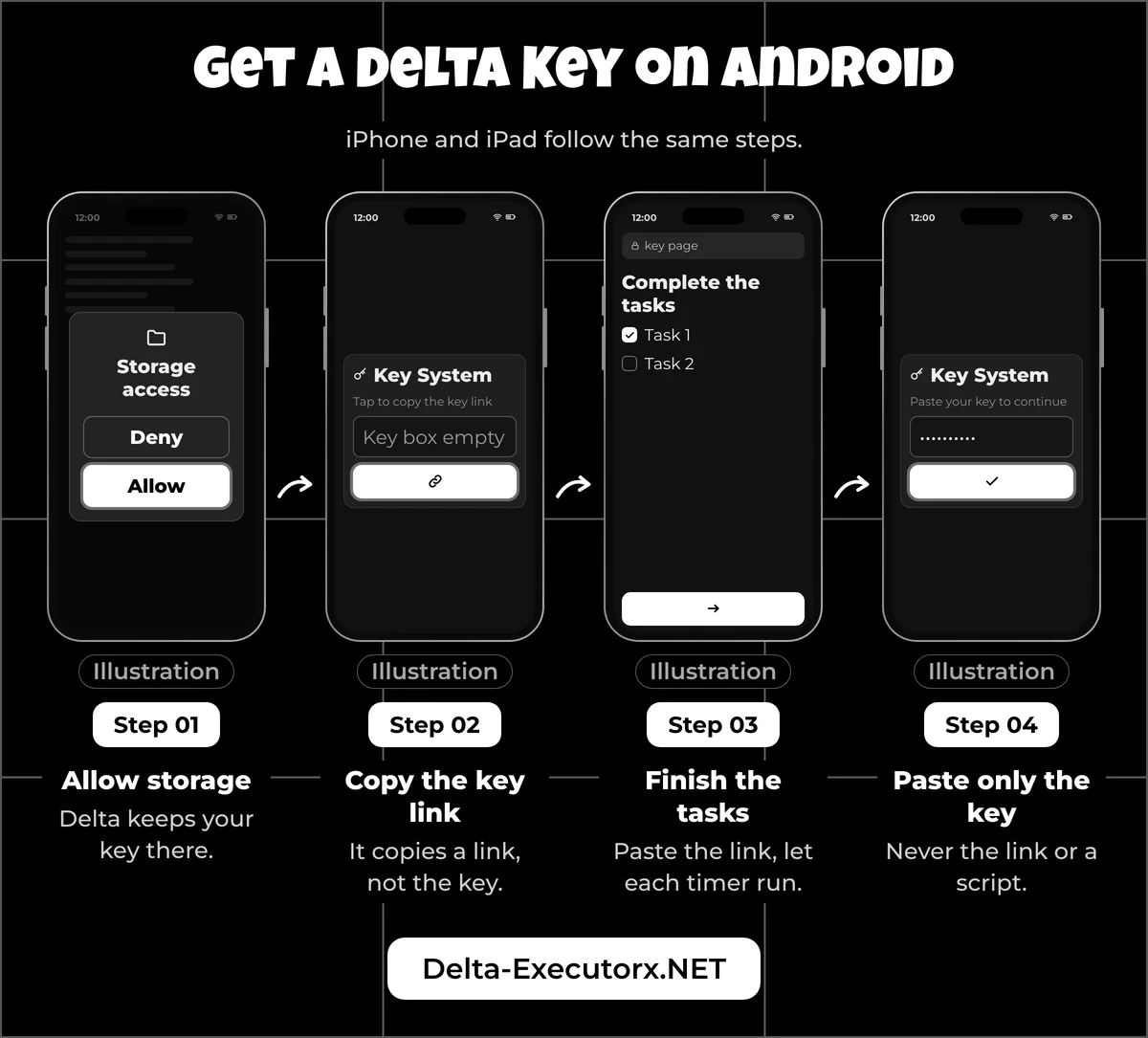
On Android the whole job is five steps: allow storage, copy the key link, open it in a browser, finish the tasks and paste the key. The developer's license key page embeds three short videos of this flow, but videos age fast, while the steps below name each screen and note what has changed on the key page this year.
Step 1: Allow Storage Access
Open Delta. On first launch, Android asks whether Delta may access your storage, so tap Allow. The developer's Android install guide gives the reason in plain words: the permission exists "to save your key, scripts and for certain features to function." Allow it before you start the tasks, since the key you earn is exactly what that permission is for.
Step 2: Copy the Key Link
With storage allowed, Delta loads its key screen: an empty key box plus a Receive Key button. Tapping that button copies a link to your clipboard, not the key itself. An empty key box at this point is normal, because the actual key only shows up at the end of the web page that link opens.
No key screen at all? The prompt can appear only after you open Roblox and join a game, when Delta's menu loads on top of it.
Step 3: Open the Link in a Browser
Switch to Chrome or any other browser, long-press the address bar, tap Paste, and go. Use the address bar rather than a search box, since a search engine returns random "Delta key" sites instead of the key page tied to your copy of Delta. A quick "verify you are human" check can load first; if it appears, tick it and wait. The page that follows is titled Delta Android Keysystem.
Step 4: Finish the Key Page Tasks
Tap the page's own task button and let each timer run out before you move on. When a task clears, the page's next button turns active, and tapping it opens the following task or your key. The number of tasks varies, and the gateway hosting them rotates over time, which is why older videos rarely match the screen in front of you.
Three things changed on the key page this year. The next button can carry the gateway's own name, such as "Lootlabs", where older videos show "Continue", and it is still the right button. Tapping a task and jumping straight back no longer counts it, so open the task and stay on the page it loads. And when a timer reaches zero but the button stays grey, the task most likely didn't register, so run it again instead of waiting longer.
If a new tab opens during a task, switch back to the key page tab and keep that tab open. The decoder table further down sorts the real prompts from the ads, so keep it open if this is your first key.
Step 5: Paste the Key Into Delta
When the last task clears, the page shows your key with a Copy button beside it. Tap it, switch back to Delta, long-press the key box, tap Paste, then confirm with the button below the box.
Paste only the key. The developer's troubleshooting notes say that pasting the link instead triggers a "key too long" style error, and a pasted script fails the same way. If that message appears, return to the browser tab and copy the key again. That paste is the whole of "installing" a Delta key; there is no file to download or open.
How to Get a Delta Key on iOS
On iPhone and iPad you follow the same five steps: copy the key link in Delta, open it in Safari or another browser, finish the tasks and paste the key. Three things behave differently on Apple devices, and knowing them in advance saves a second run through the tasks.
First, the page has its own name, Delta iOS Keysystem, although the tasks work exactly like Android Step 4. Second, the fastest way in is to touch and hold Safari's address bar, then tap Paste and Go. If the menu offers Paste and Search instead, which happens when the clipboard holds plain text, or Safari answers with an "address is invalid" message, your clipboard holds something other than the link. Copy it from Delta again. A plain dark blue screen after the paste is the developer's "blank page" case rather than a bad link: switch networks or try another browser. Third, the developer lists an hour-long wait among known free-key outcomes, and it can happen on iPhone too.
If Delta closes before you ever reach the key screen, the key is not the problem. The developer's own FAQ answers "Is Delta down?" for iPhone users with a flat no and calls it "a certificate issue": a revoked certificate stops the app at launch. The fix is a reinstall through the steps for Delta Executor on iPhone and iPad. When iOS blocks the app with an "Untrusted Enterprise Developer" alert instead, trusting the Delta developer profile under VPN and Device Management gets you through to the key screen.
How to Get a Delta Key on PC
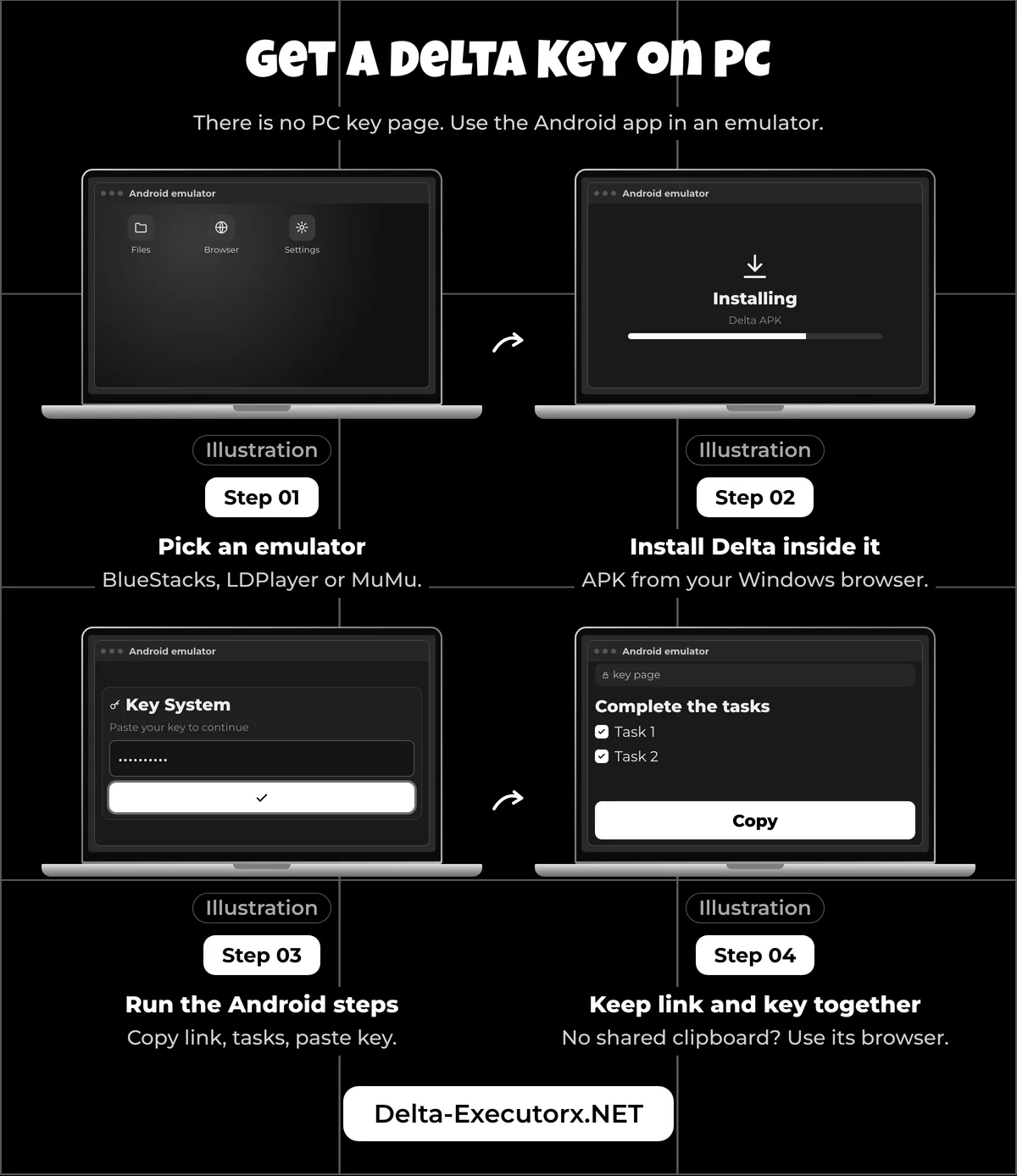
There is no PC key page, because the developer has discontinued the Windows version of Delta. On a computer you install the Android Delta app inside an emulator and then get the key with the Android steps above.
- Pick an emulator. The developer's docs name BlueStacks, LDPlayer and MuMu Player, and the comparison of the best emulator for Delta shows which one suits an older or low-memory PC.
- Install Delta inside it. The developer advises downloading the APK with your PC's own browser rather than one inside the emulator, and the setup guide for Delta Executor on PC walks through each install screen.
- Run Android Steps 1 to 5 in the emulator. The emulator runs the same Android app, so the key flow is the one above.
- Keep the link and key in one place. If pasting between Windows and the emulator fails, load the key link in the emulator's own browser and copy the key there.
A valid key still doesn't promise a playable game. In its 7 August 2025 emulator update, Roblox said players "without creator permissions will be kicked if detected on an emulator", with an exception only for experiences you can edit. Its anti-cheat help names the message "Emulator Detected". The same help page warns that repeated detections can bring a suspension or a ban, and no Delta key gets you past the check. Any "Delta PC key" or Windows .exe sold as Delta is fake, and antivirus tools flag Windows files passed around under that name as malware.
Delta Key Page Buttons and Ads
Only the page's own task, continue and copy buttons are real; everything else on the screen is advertising. An outside company hosts the key page, and the task step sits on ad-link services that change every few weeks or months. None of them needs you to install anything to hand over a key.
| Prompt on the key page | Real step or ad | What to do |
|---|---|---|
| The page's own task or continue button | Real | Tap it, then wait for the timer |
| A countdown timer | Real | Stay on the tab until it reaches zero |
| The final Copy button next to your key | Real | Tap it, then paste in Delta |
| "Install this app and keep it open for 30 seconds" | Ad | Skip it |
| A VPN app offer | Ad | Skip it |
| "Are you over 18?" check | Ad | Close it |
| A request to show notifications | Ad | Tap Block |
| "Your iPhone has been hacked" or a virus warning | Ad | Close that tab; it leads to a VPN app in the App Store |
| A "bypass" site promising the key without tasks | Not part of the key system | Skip it; these sites end on "bypass failed" |
| An APK, zip or file download | Ad | Don't download or open it |
The VPN row deserves a second look. The developer's troubleshooting does suggest a VPN when the key page stays blank or tasks stall, but that means one you already use, never an app an ad on the page pushes at you. Switching between Wi-Fi and mobile data, or opening the link in a different browser, fixes the same problem without installing anything. Each gateway lays out its screens differently, and the Delta Executor Linkvertise, Work.ink and LootLabs walkthrough shows where the real button sits on each one.
Is It Safe to Get a Delta Key?
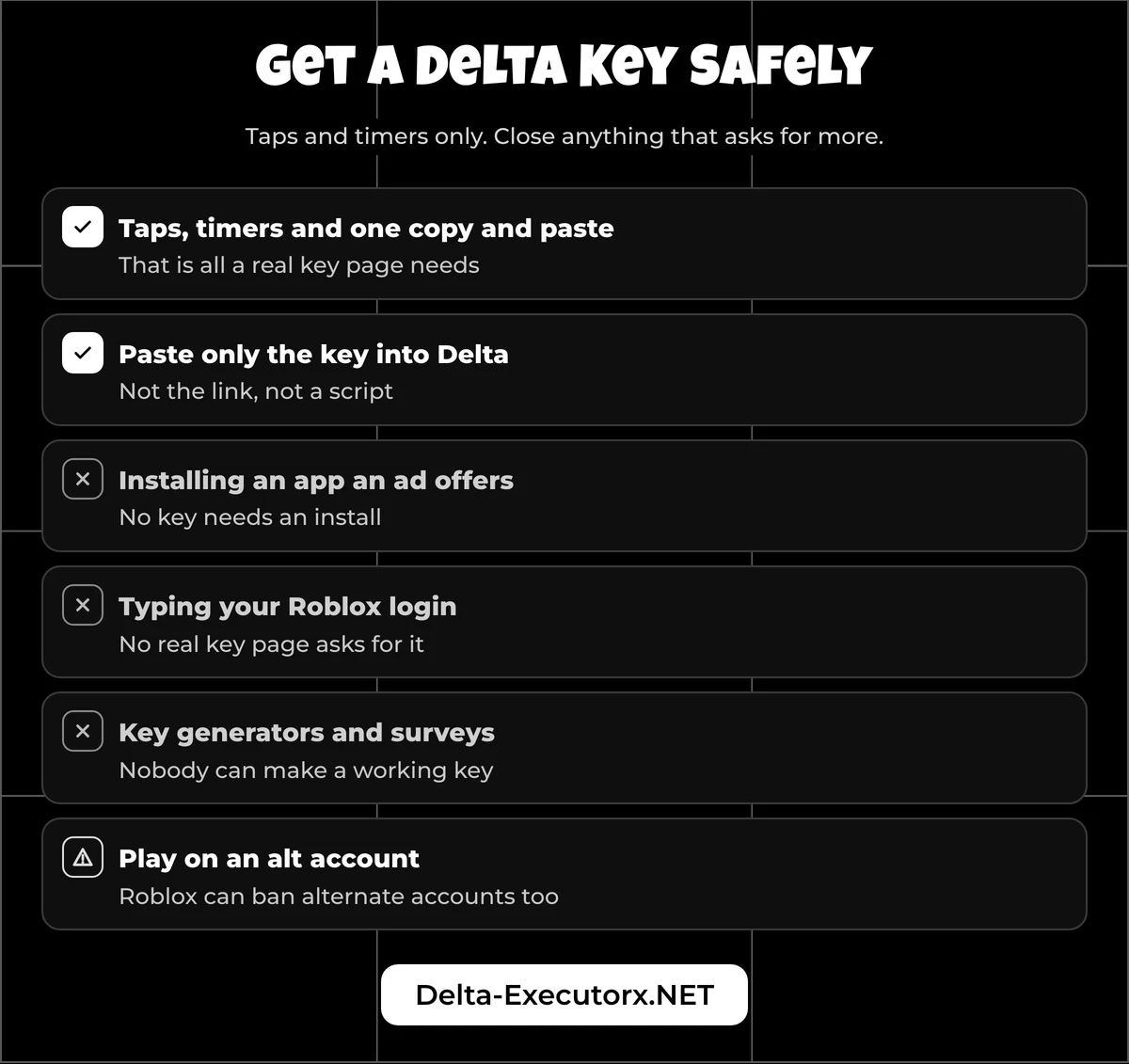
Getting the key is low risk as long as you stick to taps, timers and one copy and paste. The real dangers are installing what an ad offers and typing your Roblox login where it doesn't belong, and no genuine key page needs your Roblox username or password, so close any page that asks.
Roblox's own account advice makes the same point: "The most common way players lose their account is by sharing their login information directly with others or by filling out online surveys." Roblox staff never ask for your password, browser cookies or 2-step verification codes, and its Keep Your Account Safe page lists the other warning signs. Its Cheating and Exploiting article adds the file risk: "Many exploits are scams to get you to download malware, such as a keylogger." A "key generator" download fits that description exactly.
Using Delta in a game is a separate risk from getting the key. Delta breaks Roblox's rules against exploits, and while the developer calls bans rare, it still suggests playing on an alt account. Roblox's Terms let it suspend or ban alternate accounts as well, with Robux and items lost, and the breakdown of Delta ban risk lays out the risk of each action in one table.
Is It the Key or Something Else?
A rejected key usually means you pasted the wrong thing or your free key has expired, but several errors that look like key failures come from somewhere else entirely. Find your message in the table before you spend another few minutes on the tasks.
| What you see | What it means | First move |
|---|---|---|
| "Invalid key" or "key too long" | The link or a script went into the key box | Copy the key again and paste only the key |
| "Expired", or Delta asks for a key again later | Your free key ran out | Repeat the steps for your device |
| Blank key page, looping tasks, "Failed to cache link" or an hour-long wait | A key page problem the developer lists | Switch networks or browsers, then see the fixes below |
| "Upgrade" prompt, or Error 280 on joining a game | Delta is behind the current Roblox version | Wait for a Delta update; a new key won't help |
| iPhone: Delta won't open at all | The iOS certificate was revoked | Reinstall Delta, as in the iOS section |
For the key page errors, the guide to a Delta key not working pairs each message with its own fix. An upgrade prompt is a version mismatch rather than a key fault, and the Roblox upgrade error fix lists the Delta build that fits the current Roblox release. If Delta seems broken for everyone at once, a quick Delta status check tells you whether waiting is the only option.
Do Roblox Game Scripts Need Their Own Key?
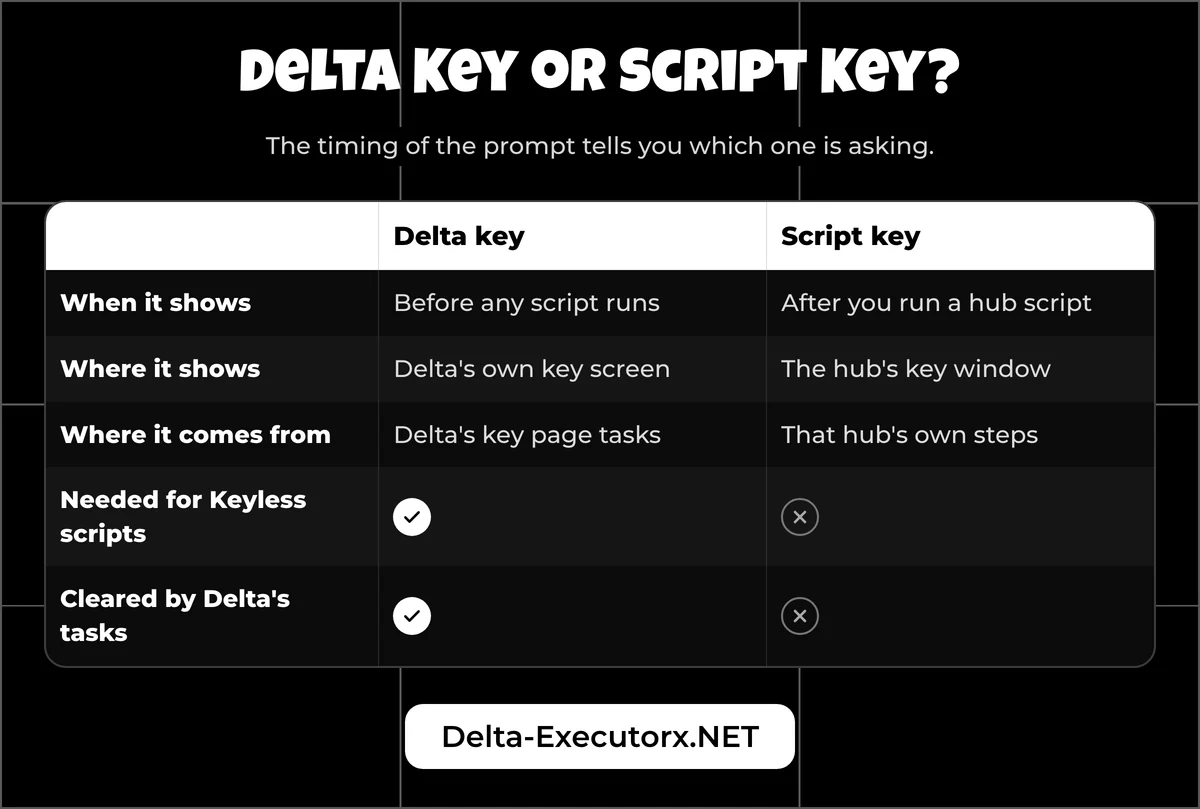
Often, yes. Your Delta key activates Delta itself, but many script hubs run their own key system on top of it. In public script libraries, many popular hubs for Blox Fruits, Grow a Garden, Steal a Brainrot and 99 Nights in the Forest are flagged by their authors as needing a key.
The timing of the prompt tells you which key is being asked for:
- Delta key: Delta's own key screen, shown before you can run any script.
- Script key: a window that opens only after you run a hub script.
A script key comes from that hub's own key window, so running Delta's tasks again won't clear it. A "Keyless" or "No Key" label only tells you the hub author skipped a hub key; Delta still asks for its own key first.
Each game handles this a little differently. Blox Fruits players can see which hubs skip the extra key in the Delta Executor Blox Fruits script guide, while the page on Grow a Garden scripts explains what auto farm and pet spawner hubs actually do. For survival games, the Delta Executor 99 Nights in the Forest script guide covers why that game's scripts still ask for a key. The dated status of Steal a Brainrot scripts explains why they stop working after game updates.
What Is the Delta Executor Key System?
The Delta Executor key, which the developer calls a license key, is the code Delta needs before its features switch on. The developer's docs put it in one line: "Delta requires a license key to activate and use its features." Players meet four kinds of "key", and only the first two come from Delta.
| Key you meet | Source | Cost | Tasks | How long it lasts |
|---|---|---|---|---|
| Free key | The key page your copy of Delta links to | Free | Yes, each time it runs out | Temporary; no length published |
| Premium key | The developer's shop | Paid | None | "A certain amount of time or lifetime", in the developer's words |
| Script hub key | The hub's own key window | Varies by hub | The hub's own steps | Set by each hub |
| Posted or generated key | Comments, videos, generator sites | Free or "survey" | None | Not a developer key; expect it to fail |
Premium is still a key rather than a keyless build, and the shop is sometimes out of stock or offline; current prices and safe buying steps are on the Delta Premium key page.
"Delta X" is a community nickname for the same Delta app, so it uses the same key and the same key page.
FAQ
Can I copy and paste someone else's Delta key?
Don't count on it. Delta key codes posted in comments, videos or chats don't come from the developer and may not work for you. The only free source is the link your own copy of Delta generates.
Is there a free Delta key generator?
No. Delta key generators and "free key" posts are not from the developer, and nobody can make a working Delta key outside the in-app tasks or a Premium purchase. Treat any generator that asks you to download a file or fill in a survey as bait.
How long does a Delta key last?
A free Delta key is temporary, and the developer doesn't publish an exact length. To see the time left on yours, follow the checks on the Delta Executor key lifetime page.
Do I need a new Delta key every time?
No. Delta saves the key to your device's storage, so closing and reopening the app should keep it until the free key runs out. If Delta asks again right after a restart, check that storage access is still switched on.
Can you get a Delta key automatically?
No. Nothing fetches a free key for you; a paid Premium key skips the tasks, but you still paste it in once. Sites that promise Delta with no key at all are covered in Delta keyless versions explained.
Is the Delta key free?
Yes. The developer says Delta is "completely free by default" and that paying will never be mandatory, so the standard key costs only the time spent on the key page tasks. Premium is optional: it skips those tasks and adds extra features.
Can I download a Delta key?
No. A Delta key is a short code you copy from the key page, not a file. Any site offering a Delta key as an APK, zip or other download is not part of the key system.
Conclusion
Every Delta key, on any device, comes from the same place: the key button inside Delta, a few tasks on the key page and a clean paste of the key itself, never the link. Skip anything the page asks you to install, and treat posted keys and generators as bait. Once Delta accepts your key, the next step is to run scripts in Delta in your first game.