

App Information
| Delta build | 2.745, the Android APK |
| Runs on | Windows 10 or 11, inside an Android emulator |
| Windows installer | None from the developer |
| Checked | 8 November 2026 |
It is the very file on the latest Delta build for phones, since an emulator is just an Android device running as a program.
Can You Get Delta Executor on PC?
Yes, but only through an Android emulator. Delta's developer offers Android and iOS versions and lists Windows as discontinued, and its own Windows page now loads the Android download instead.
Delta used to have a Windows version, which is why old videos and download sites still use the "Delta PC" name. Today the developer's own advice for computer owners is to run the Android app in BlueStacks, LDPlayer or MuMu Player and to download the APK with the PC's normal browser. Each route people try on a PC ends up in one of five places:
| Route on a PC | What it really is | Runs Delta? | Main risk |
|---|---|---|---|
| Android emulator + Delta APK | A Windows program that runs Android apps | Yes, this is the only working PC route | Roblox kicks accounts it detects on emulators |
| Delta on your phone or tablet | The Android APK or the iOS app on the device itself | Yes, Delta's main platforms | Roblox account rules |
| A "Delta .exe, .zip or .rar for Windows" | A file built by a third party | Not from Delta's developer | Antivirus flags and stolen accounts |
| Microsoft Store app "Roblox - Windows" | Roblox's newer Windows client | No Delta build exists for it | None, it simply won't work |
| Android apps built into Windows 11 | Windows Subsystem for Android | No, Microsoft retired it on 5 March 2025 | None, it is gone |
So the emulator is the one route that works, and almost everything else sold as "Delta for PC" is either gone or a trap. Apple and Google laptops follow different rules, worked out in Delta on a Mac or Chromebook.
Can You Use Delta on PC Without an Emulator?
No. Delta is an Android and iOS app, and no current Windows build comes from its developer, so "no emulator" downloads are tools made by someone else.
Those tools hook into the regular Windows Roblox client, which has shipped with Hyperion, Roblox's anti-tamper system, since 2023. Roblox's Terms of Use forbid any attempt to "circumvent" the technical measures that guard its service. A tool built to do exactly that puts your account at more risk, not less. Players who want a true Windows program are after a different kind of tool, and Roblox executors for each device shows which names run on Windows.
Delta Executor on Microsoft Store Roblox
Delta cannot be added to the Microsoft Store app "Roblox - Windows", and Windows 11 no longer runs Android apps on its own.
"Roblox - Windows" is the blue-icon app that replaces the older Roblox app, which Roblox says "will eventually stop working". Windows 11 once installed APKs through the Windows Subsystem for Android. Microsoft removed it, along with the Amazon Appstore, from the Microsoft Store on 5 March 2025. That leaves a third-party emulator as the only way to open an APK on Windows. It is also why "how to use Delta on Microsoft" searches lead back to the steps below.
Delta Executor PC System Requirements
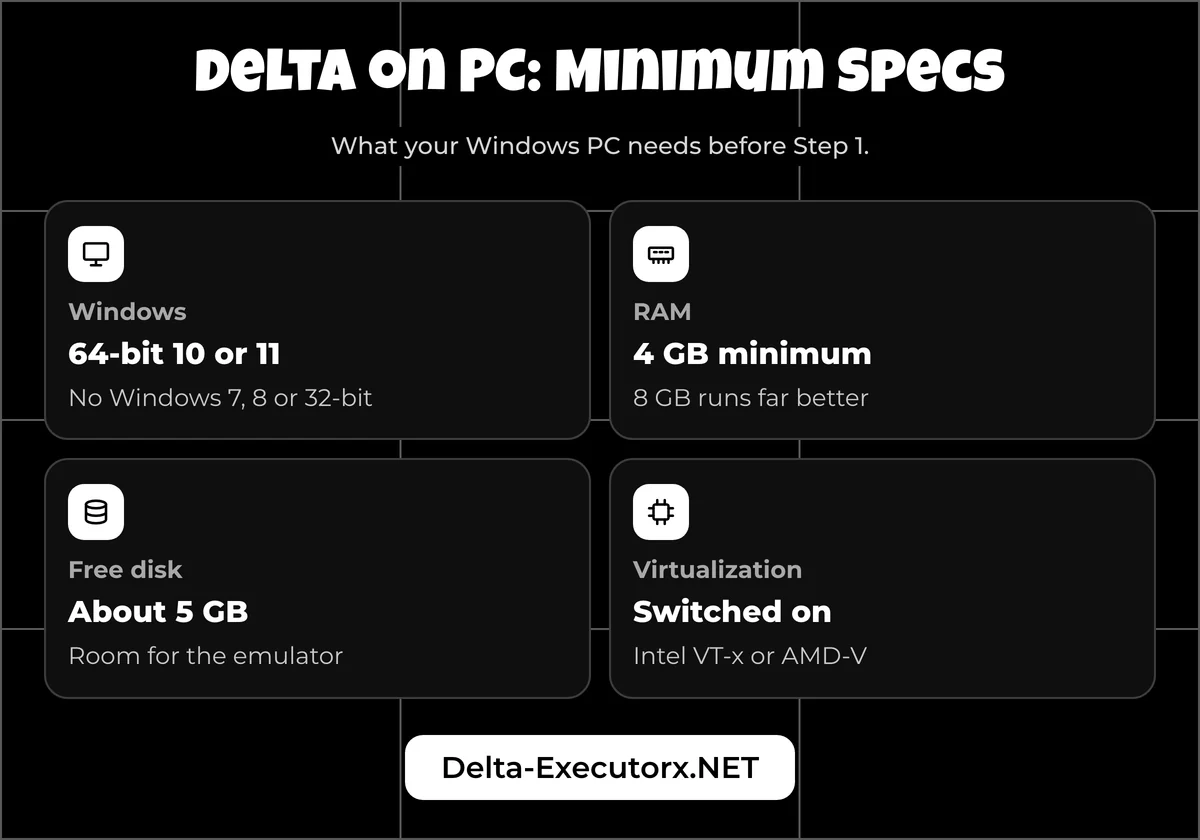
Your PC needs 64-bit Windows 10 or 11, because Roblox will not install on Windows 7, Windows 8 or any 32-bit Windows. Add at least 4 GB of RAM, about 5 GB of free disk space and virtualization switched on, and the emulator has room to work.
Plenty of download sites print spec sheets with Windows 7 support or hardware Roblox never asks for. The Windows side comes down to this:
| Item | Roblox on Windows | What Delta on PC needs |
|---|---|---|
| Windows | 64-bit Windows 10 or 11 | The same, since the emulator runs Roblox's Android app on top |
| RAM | 1 GB or more | 4 GB at the floor, 8 GB for smooth play |
| Free disk | 300 MB or more | About 5 GB for the emulator and Roblox |
| CPU | 1.6 GHz or faster, made in 2005 or later | Virtualization switched on in the firmware |
| Android inside the emulator | Not relevant | Android 8.0 or newer, Roblox's mobile minimum |
| Connection | 4 to 8 Mb/s | The same, plus the key website |
Each emulator adds a few rules of its own on top, listed in the emulator comparison linked under Step 3.
Delta Executor Laptop Requirements
A laptop follows the same rules as a desktop: 64-bit Windows 10 or 11, at least 4 GB of RAM and virtualization turned on. Brand makes no difference to the steps, so an HP, Dell, Acer or Lenovo laptop installs Delta the same way.
On a 4 GB laptop the emulator has no memory to spare, so close your browser tabs and other programs before you open it. You don't need your laptop maker's BIOS key either, because Step 2 reaches the firmware settings through Windows itself. Pick a laptop with an Intel or AMD chip, because Snapdragon models get just one emulator build, still in beta.
How to Install Delta Executor on PC
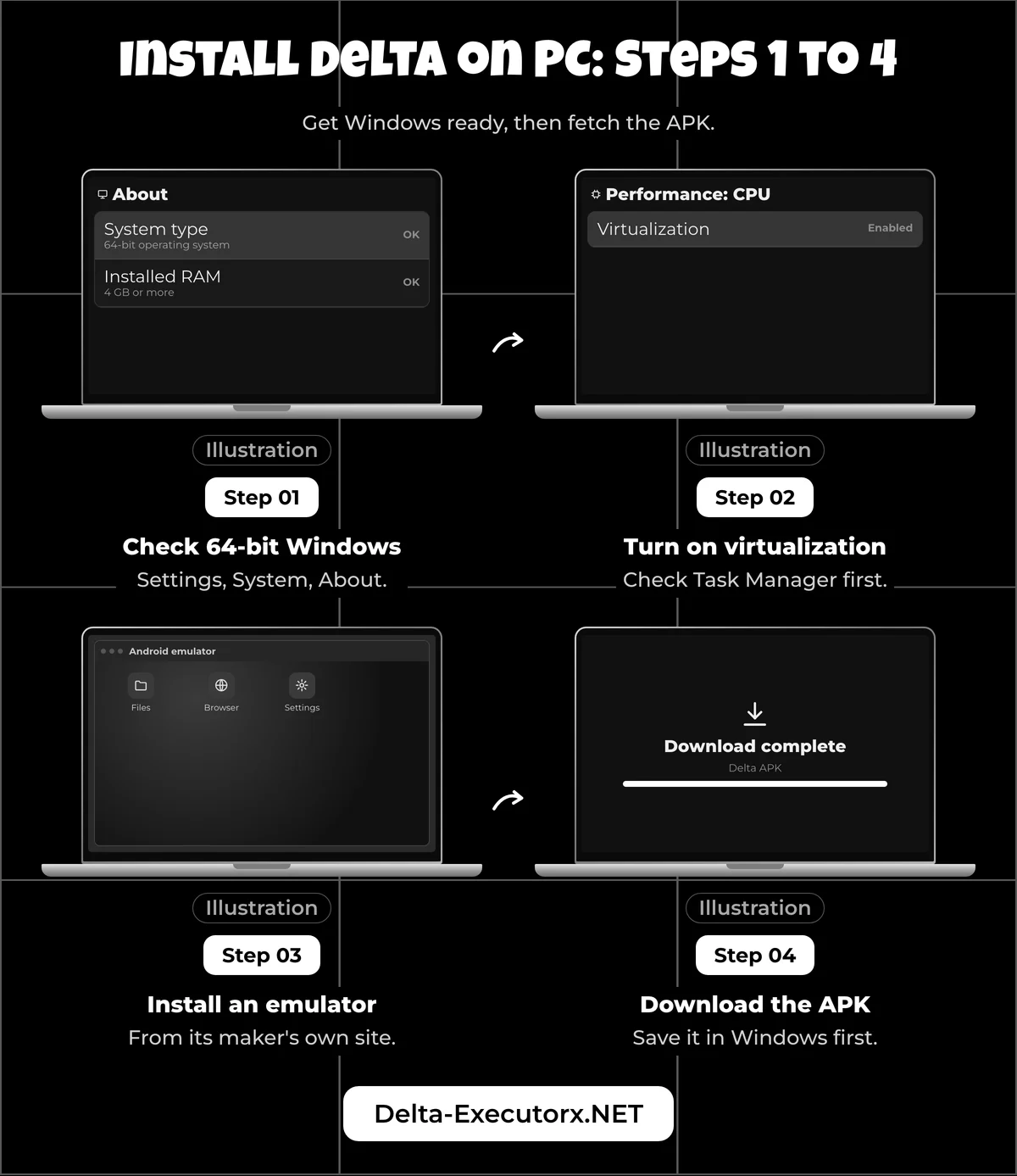
Install an Android emulator, download the Delta APK with your Windows browser, then drag the APK into the emulator. The developer names BlueStacks, MuMu Player and LDPlayer as options, and the steps below work in any of them.
Step 1: Check That Windows Is 64-bit
Right-click Start, open Settings, then System, then About, and look under Device specifications for the "System type" line. Microsoft uses the same path on Windows 10 and 11, and the line must say "64-bit operating system".
The same block lists "Installed RAM", which should read 4 GB or more. If the system type says 32-bit, stop here, because Roblox does not install on 32-bit Windows and no emulator changes that.
Step 2: Turn On Virtualization
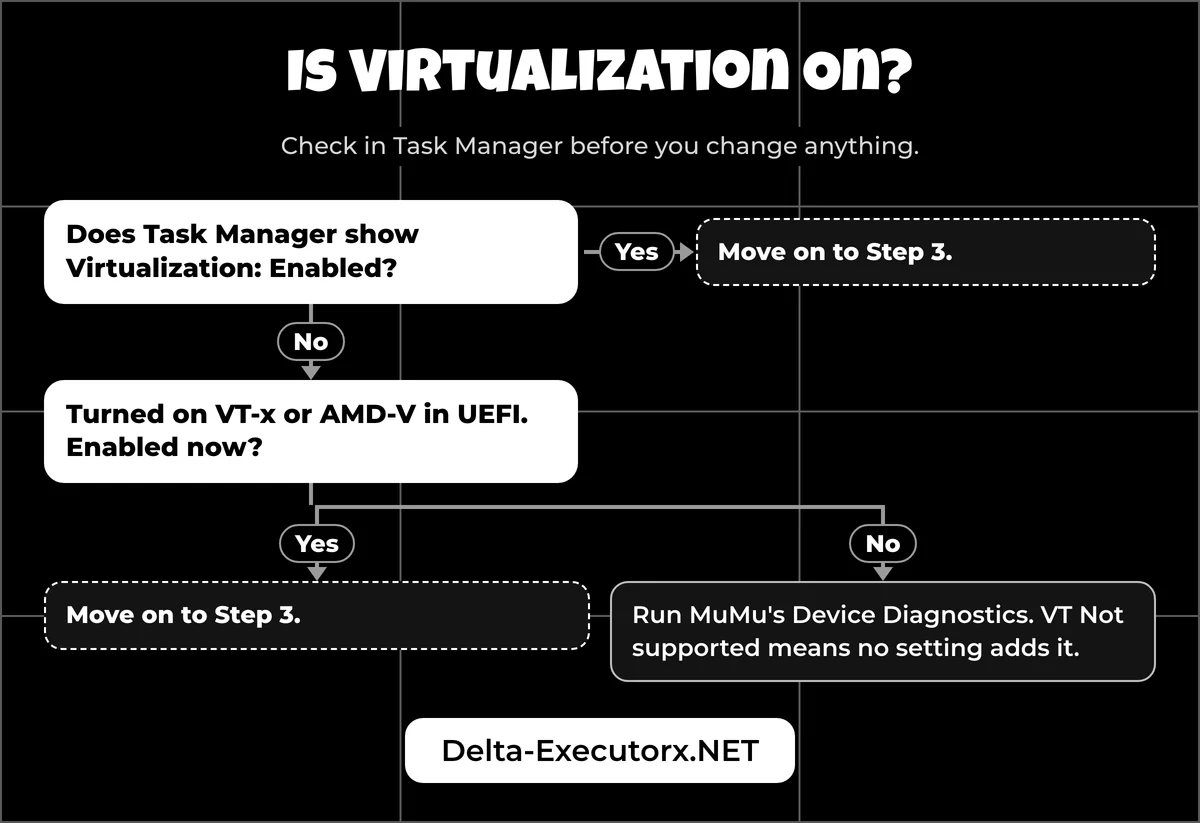
Emulators lean on a CPU feature called virtualization, and on many PCs it is already on. Check first: in Task Manager, open the Performance tab, pick CPU and read the "Virtualization" line.
If it says Disabled, switch it on in your PC's UEFI firmware:
- Open Settings, then Recovery (System > Recovery on Windows 11, Update & Security > Recovery on Windows 10).
- Next to Advanced startup, click Restart now.
- Choose Troubleshoot, then Advanced options, then UEFI Settings, and click Restart.
- Find the virtualization option in UEFI, turn it on, then save and exit.
Microsoft's guide to enabling virtualization on Windows shows the same route. After the restart, Task Manager should read "Virtualization: Enabled".
Step 3: Install an Android Emulator
Install MuMu Player on an Intel PC, or BlueStacks on an AMD PC or one that keeps Hyper-V on, and choose an Android 9 or newer instance. The BlueStacks, MuMu and LDPlayer comparison explains each pick and when LDPlayer suits your PC better.
Step 4: Download the Delta APK on Windows
Use your normal Windows browser, such as Chrome or Edge, and the download box at the top of this page. The developer's own PC instructions say to download the APK on the computer rather than with a browser inside the emulator.
Before you install, open your Downloads folder and check the browser didn't stop halfway. If the download shows as failed or the file looks cut short, delete it and download it again.
Step 5: Install the APK in the Emulator
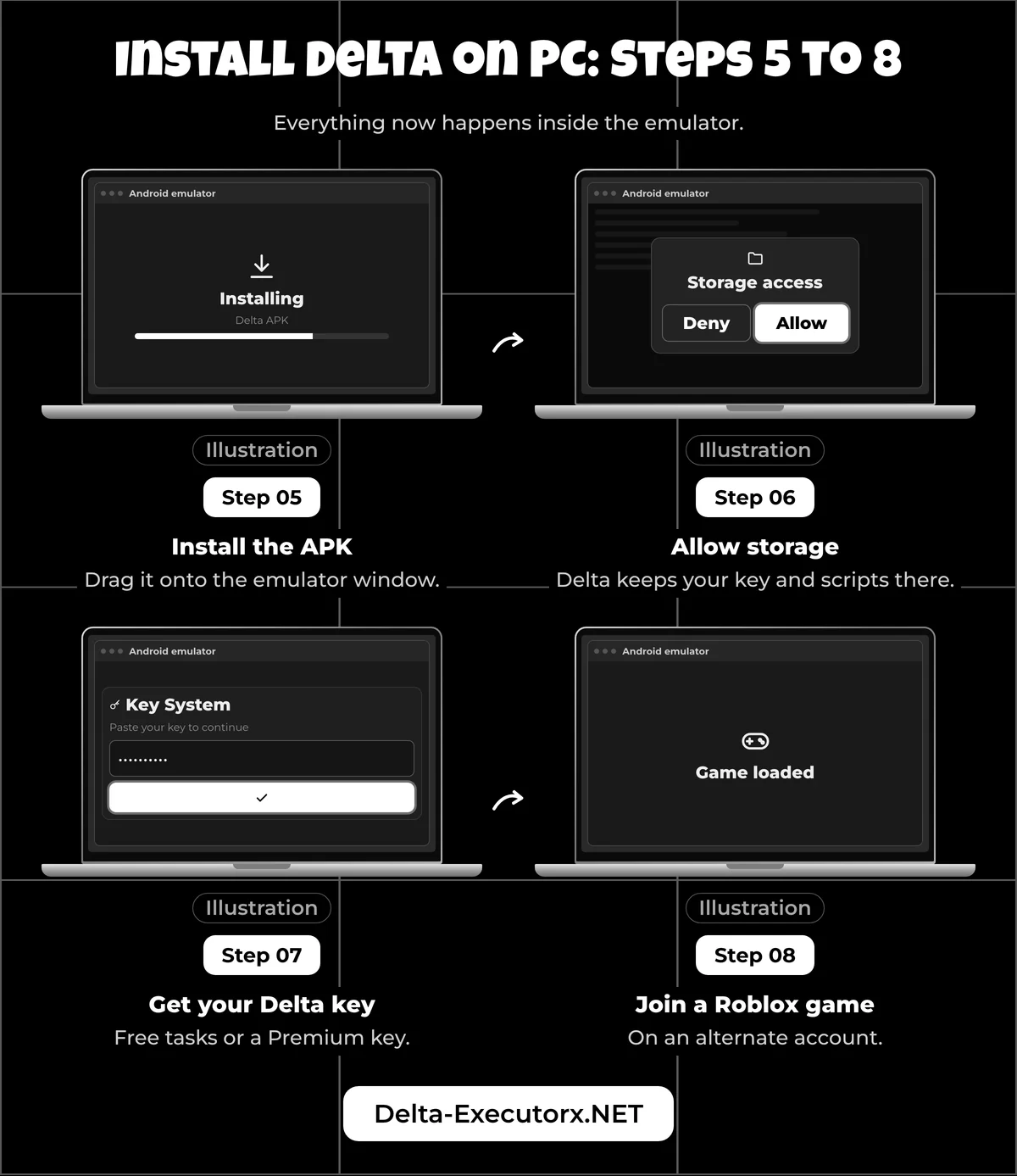
First remove any Google Play Roblox from the emulator, as Delta's install guide asks. Then drag the APK from your Downloads folder onto the emulator window, or use the emulator's own APK install option. Button names differ between emulators, but dragging the file works in all of them.
When the install finishes, the Delta icon appears on the emulator's home screen. An "App not installed" or "installation failed" message has its causes in the fixes table further down. The Delta Executor app not installed fix explains each Android install message in full.
Step 6: Open Delta and Allow Storage
Launch Delta from its icon inside the emulator, not from your Windows desktop. The icon may be labelled Roblox rather than Delta, because the Delta APK carries the Roblox name.
Click Allow when Delta asks for storage on first launch. If you denied it by mistake, open the emulator's own Android Settings, then Apps, the Delta app (it may be listed as Roblox) and Permissions, and allow storage there.
Step 7: Get Your Delta Key
The emulator needs a Delta key just like a phone does, earned on a website and pasted back into Delta. The Delta key steps cover the key page on PC, including copying the key between Windows and the emulator.
Step 8: Join a Roblox Game
Open Roblox inside the emulator and use a spare account you could lose, for the reasons in how Roblox bans Delta users.
Then join a game you have a script for from the Delta scripts hub. One of three things happens:
- The game loads normally. Open Delta's floating button, paste a script and click Execute. If your emulator shares the Windows clipboard, a script copied in Windows can go straight in.
- "Emulator Detected". Roblox removed you for playing on an emulator; the section after the fixes table explains what that means.
- A hardware security message. That game only accepts real, unmodified phones, though other games may still load.
Delta Executor PC Update
There is no separate PC update. Drag the newer APK from the box at the top into the emulator, the same file phones update with, and saved scripts stay put. When Roblox moves first, Delta refuses to join games until a matching build lands, which Delta's version mismatch message explains and the live Delta build check tracks.
Delta Executor PC Not Working
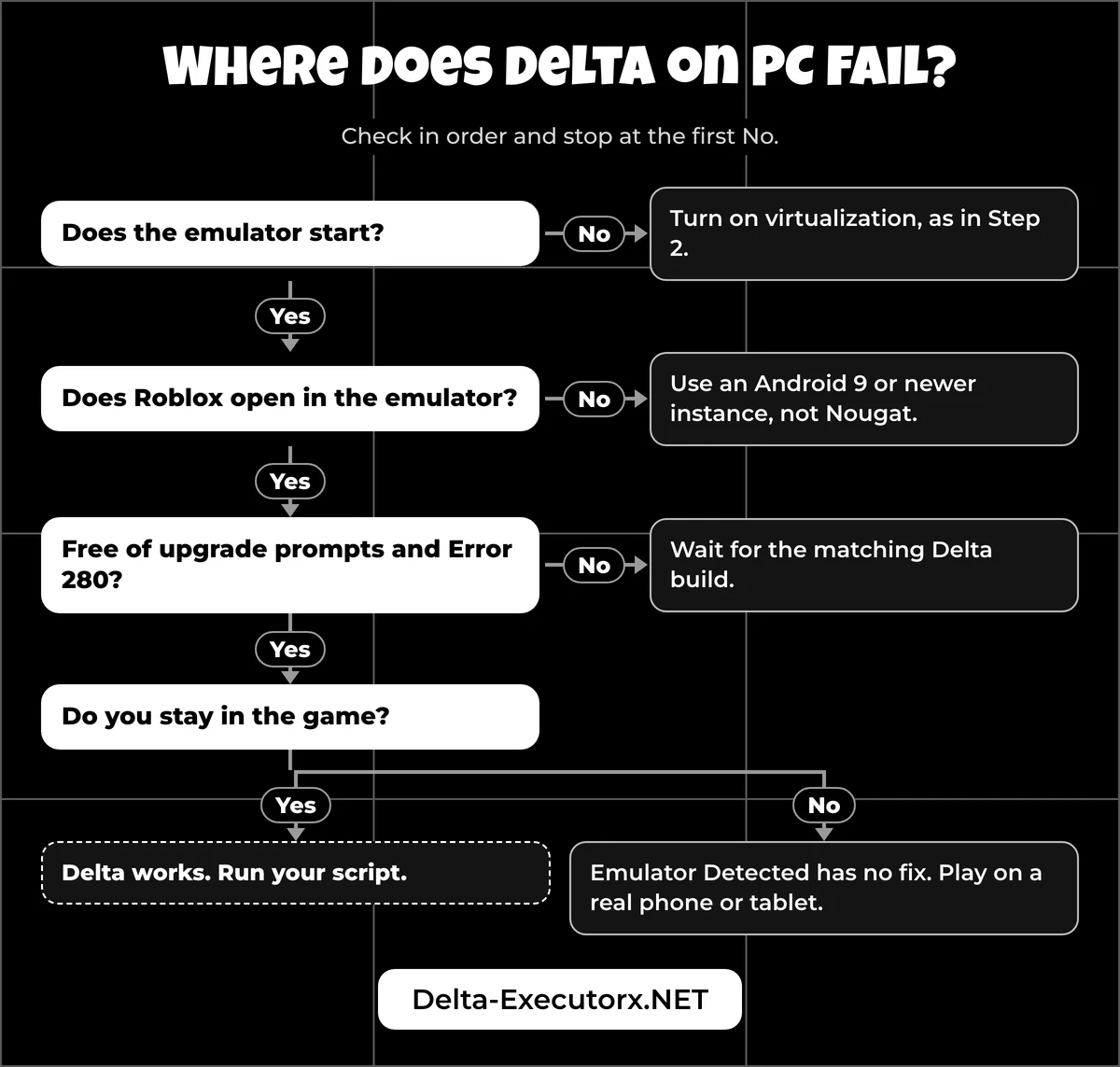
Only one message below, the "upgrade" prompt, comes from Delta itself; the rest come from the emulator, Windows or Roblox. Check virtualization first, then whether Roblox is kicking the emulator, because no other fix helps until both are clear.
The table follows the order of the install steps, so you can match the message on your screen to the stage you reached:
| Stage | What you see | Cause | Fix |
|---|---|---|---|
| Emulator | The emulator won't start or asks you to enable virtualization | Virtualization is off in UEFI | Turn it on with Step 2 |
| Install | "App not installed" or "installation failed" | The APK's native code doesn't match the emulator's Android setup, or a Roblox app with a different signature is already installed | Remove any Roblox app from the emulator, download the APK again and retry |
| Key | The key page won't load in the emulator's browser | A browser problem inside the emulator | Get the key with the Windows browser, as the key steps show |
| Launch | Roblox won't open at all inside the emulator | The instance runs Android 7 (BlueStacks Nougat), below Roblox's Android 8.0 minimum | Move to an Android 9 or newer instance, as Step 3 shows |
| Launch | An "upgrade" prompt in Delta, or Error 280 in Roblox | Roblox updated and Delta is one build behind | Wait for the matching Delta build, then install it with Steps 4 and 5 |
| Join | "Emulator Detected" | Roblox kicks accounts on emulators (since August 2025) | No setting fixes it; play on a real phone or tablet |
| Join | A message that the game needs extra hardware security or a trusted operating system | The game uses Android remote attestation, which treats emulators as untrusted | That game can't be played from an emulator; try another game |
| In game | Roblox closes back to the emulator home screen, or "Roblox keeps stopping" | Too little free RAM for the emulator | Restart the emulator and close other Windows programs to free RAM |
Lag, controls and per-emulator speed settings are tuned in the emulator itself, covered in the comparison linked under Step 3. A rejected key rather than a page that won't load has its own Delta key error fixes. If the task site itself is the snag, the three ad-link key sites each get a screen-by-screen guide.
Problems that also happen on phones belong to the six Delta Executor checks, and crashes on launch have their own Delta crashing fix. If Execute does nothing inside the emulator, the Delta not injecting fix separates an attach failure from a script fault. A script that throws an error is handled in the Delta script error fix.
Is There a Fix for "Emulator Detected"?
No. Roblox's own help page says it doesn't allow emulators unless the account has place edit access. It names BlueStacks and NoxPlayer as examples and points to a physical Android or iOS device as the fix.
The rule took effect on 7 August 2025 and is still listed on Roblox's Anti-cheat Messages page. The "place edit" exception only covers games you build yourself, where you hold Edit permission through Roblox Studio's Collaborate menu, so it is no way in for a player. Roblox may suspend an account for a while after anti-cheat messages and ban it permanently "if it happens repeatedly", so don't keep rejoining after a kick.
The rule covers every game, but enforcement is uneven: some accounts still join through an emulator while others are kicked on the first try. Some game creators also add their own community-made emulator checks on top of Roblox's. If the kick keeps coming back, Delta on a phone is the reliable path, and iPhone owners can follow the Delta Executor iOS install instead.
Are Delta Executor .exe Files Real?
No. Since no Windows Delta exists, every "Delta Executor PC" .exe, .zip or .rar is a third-party file, whether it sits on MediaFire, a download directory or a file-sharing site.
Results for a Delta PC download tend to look like these:
- Download-directory listings that show no file name, no version and no signature.
- A third-party Windows tool that needs administrator rights, downloads a Delta APK by itself and hooks it into Windows Roblox.
- A "Delta" GitHub page with no code and no releases.
Sites titled "Delta Executor PC Official Website" are not run by the developer either, because no PC file comes from the developer at all.
Delta PC Download Red Flags
Some PC download pages also ask readers to disable Windows Defender or click past warnings, which is the opposite of safe. Stop if any of these is true:
- The file is an .exe, .zip, .rar or a password-protected archive.
- The page asks you to disable Windows Defender or your antivirus first.
- It tells you to click "Keep anyway", "Keep dangerous file" or "Run anyway" on a warning.
- You need a download manager to get the file.
- The link sits behind an ad locker, a survey or a payment.
- After installing, you see Chinese-language screens or strange pop-ups.
The emulator route never needs your antivirus off or a warning overridden, and the only Delta file it uses is an .apk. An old deltainstaller.exe may still sit on your PC and show "Error at position (line 1, column 2): The 'html' element is not declared". That installer belongs to the discontinued Windows version, so delete it instead of following old fixes that switch antivirus off.
A Windows SmartScreen warning on a "Delta" .exe means Windows doesn't recognise the file, which is a reason to stop rather than a box to click through. Executors attract malware for reasons laid out in what a Roblox executor is.
What to Do After Running a Fake File
Disconnect from the internet and run a full Microsoft Defender scan straight away. Then secure the Roblox account from a clean device, using the recovery steps in what to do if a script hacked your account.
Once the PC scans clean, the safe route is the APK in the download box above, installed into an emulator you got from its maker's own site.
Roblox Warnings After Using a Delta .exe
If Windows Roblox shows one of these messages, something from the tool is still interfering. All three are quoted from Roblox's help page and show up in the Windows Roblox app, not inside an Android emulator:
| Message in Windows Roblox | Roblox's explanation | Your move |
|---|---|---|
| "Roblox has crashed due to incompatible software:" followed by a file path | The program at that path interferes with Roblox | Find what owns that path. If it is the Delta tool, remove it; if it is a known program, close it while you play |
| "Roblox was stopped. Please ensure third-party software does not interfere with Roblox." | Another program suspended Roblox | Uninstall the tool, then use the clean boot Roblox describes (msconfig) to find anything left running |
| "Roblox cannot run inside of a virtual machine." | Roblox Player was started in a VM without GPU passthrough | Run Roblox on the PC itself. Roblox's only VM fix is GPU passthrough |
A warning that the Roblox app itself was modified is an account matter rather than a Windows one, and the ban risk page linked under Step 8 covers it.
FAQ
Does Delta Executor Work on Windows 11?
Yes, through an emulator, as long as Windows 11 is the 64-bit edition and virtualization is on. Install the emulator first, because Windows 11 has no Android support of its own.
Do I Need Roblox Installed on Windows First?
No. The Delta APK carries its own Roblox client, so the Windows Roblox app plays no part. Delta runs inside the emulator, and you sign in to Roblox there.
Can Delta Run on a 4 GB Laptop?
Yes, 4 GB is the floor, but expect slower play. Close other programs first, and treat 8 GB as the comfortable amount.
Why Does My Antivirus Block Delta on PC?
If it blocks an .exe or .zip, that file is a third-party Windows tool, not Delta, so delete it. Keep your antivirus on and use the APK from the download box instead.
Does Delta Executor Work on Windows 7?
No. Some emulators still install on Windows 7, but Roblox itself only installs on 64-bit Windows 10 or 11, so Delta has no game to attach to. Upgrade Windows or use Delta on a phone instead.
Conclusion
Delta Executor on PC means the Android APK running in an emulator on 64-bit Windows 10 or 11, with virtualization on and a spare Roblox account. Get the APK from the box at the top and follow the eight steps. Once a game loads, pasting and running your first Delta script is the next job.