

App Information
| App name | Delta Executor |
| Version | 2.743 |
| File | IPA, 137.8 MB |
| Requires | iOS 14 or newer |
| Category | Roblox script executor |
| Price | Free (a key is needed) |
| Developer | Lxnny and Team Delta |
| Updated | 21 October 2026 |
The file is scanned before upload and is safe to install. One IPA covers both iPhone and iPad, and it arrives unsigned, so on its own it won't install: iOS only accepts it after a signer app or a computer tool adds a certificate. Using an Android phone instead? Grab the Delta Executor APK for that, since the IPA only works on Apple devices.
Which iPhones Can Run Delta Executor?
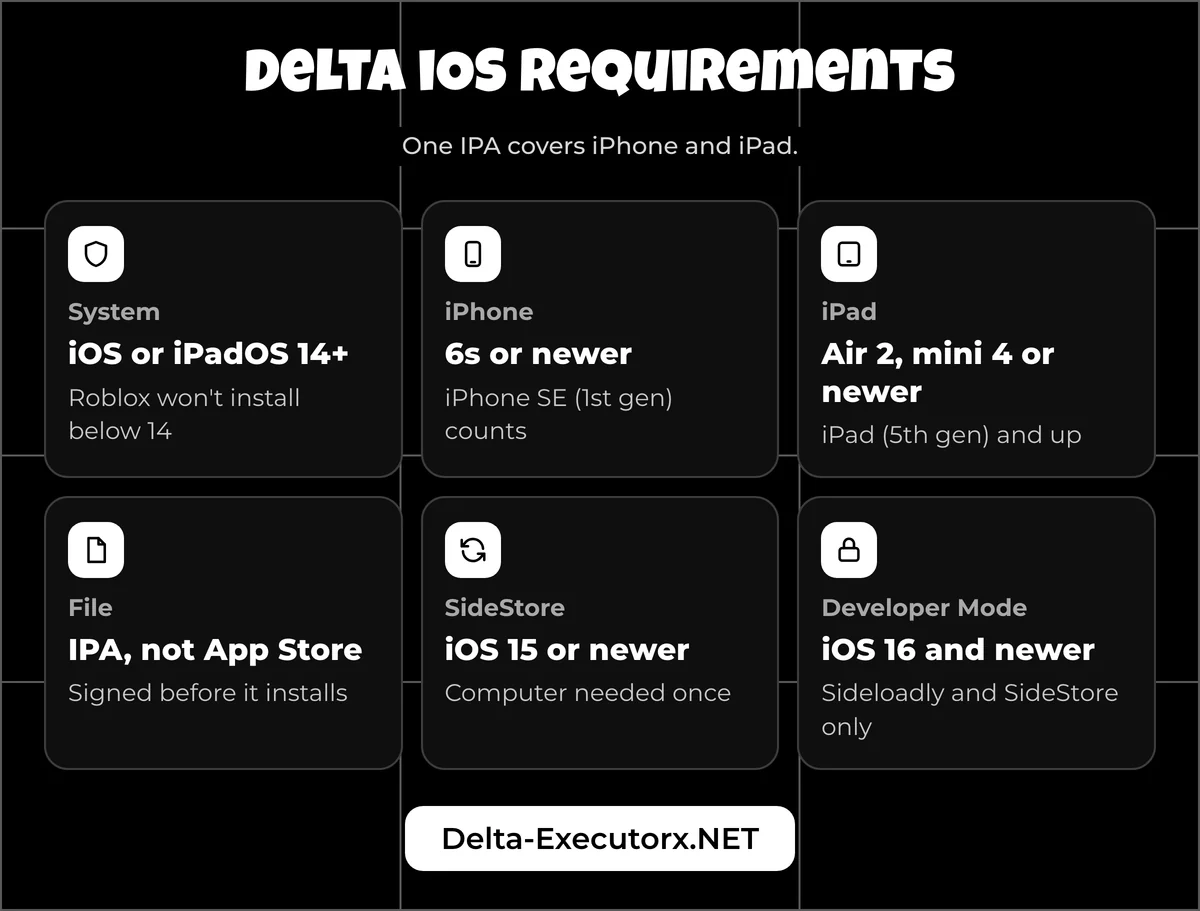
Any iPhone or iPad on iOS or iPadOS 14 or newer can install Delta, which means an iPhone 6s, iPhone SE (1st gen) or anything later. That floor comes from two places: Roblox's own iOS app requires iOS 14, and the Delta IPA declares iOS 14.0 as its minimum. The checklist under the install methods covers storage, internet and Apple ID needs.
Many guides still claim iOS 12 works. It can't, because Roblox itself won't install below iOS 14. Find your iPhone's last iOS version in the table below.
| iOS version | Roblox installs? | iPhones that stop here | Install note |
|---|---|---|---|
| 12 to 13 | No | iPhone 5s, 6 (last iOS 12) | Below Roblox's iOS 14 minimum |
| 14 to 15 | Yes | iPhone 6s, 7, SE (1st gen) (last iOS 15) | No Developer Mode step |
| 16 | Yes | iPhone 8, X | Computer methods need Developer Mode |
| 17 to 18 | Yes | iPhone XS, XR (last iOS 18) | From iOS 18 the trust button reads "Allow & Restart" |
| 26 | Yes | None (every iOS 26 iPhone can move to iOS 27) | Same as iOS 18 |
| 27 (released 14 Sep 2026) | Roblox says new iOS versions "may not immediately be supported" | Current on iPhone 11 and newer, SE (2nd gen) and newer, 16e, 17 series and Air | Same as iOS 18 |
To see which version you have, open Settings > General > About and read the iOS Version line. iPads follow the same rule: iPadOS 14 or newer, starting with the iPad Air 2, iPad mini 4 and iPad (5th gen).
Delta Executor iOS Install Methods
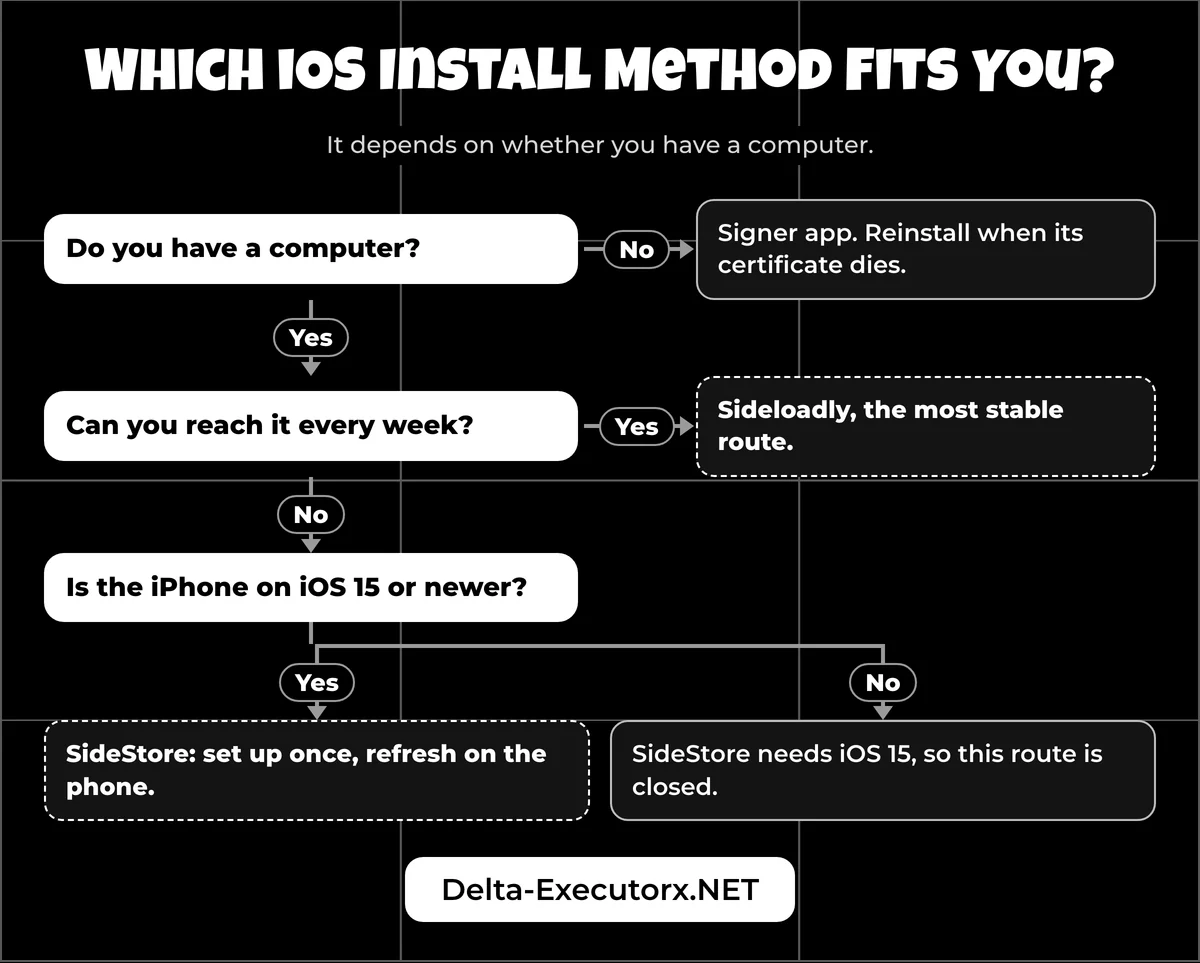
There are four ways to get Delta onto an iPhone, and the right one depends on whether you have a computer. With no computer, use a signer app; with a Windows PC or Mac, Sideloadly or SideStore signs the app under your own Apple ID, so nobody else's certificate can break it.
| Method | Computer? | Your Apple ID? | How long it lasts | What breaks it | Watch out for |
|---|---|---|---|---|---|
| 1. Signer app (KSign type) | No | No | Until the signer's certificate is revoked | A revoked or blacklisted certificate | The developer warns most KSign copies "may be outdated, revoked or blacklisted"; the developer's no-PC guide adds a DNS profile |
| 2. Sideloadly | Yes, each time | Yes | 7 days on a free Apple ID | The 7-day limit | Developer Mode on iOS 16+; child Apple IDs fail; Windows needs the web (not Microsoft Store) iTunes and iCloud |
| 3. SideStore (set up with iloader) | Once | Yes | 7 days, refreshed on the phone | A missed refresh or an expired pairing file | iOS 15 or newer only; the LocalDevVPN app must be connected for every refresh |
| Direct Install (not recommended) | No | No | Until Apple revokes the certificate | A revoked certificate | Third-party site, older build, borrowed certificate |
The developer lists all four routes and says iOS problems are "usually related to certificates", since Delta "does not handle certificate configuration or signing". That leaves three simple choices:
- No computer at all? Use Method 1, and expect to reinstall whenever the certificate dies.
- A computer you can reach every week? Sideloadly is the most stable route.
- A computer only once? Set up SideStore, then refresh Delta from the phone. On iOS 14 this route is closed, because SideStore's own docs require iOS 15.
Before You Install Delta on iPhone
Most failed installs trace back to something missing before step one. Run through this list first:
- iOS or iPadOS 14 or newer (15 or newer for SideStore).
- Free space for the 138 MB download plus the app itself; the IPA's contents unpack to about 277 MB.
- A working internet connection for the trust step, with no DNS blocker or VPN filtering Apple's servers.
- A phone passcode set, since Developer Mode and SideStore both ask for it.
- For computer routes: an adult Apple ID with two-factor codes reaching you, ideally a spare account.
- For computer routes: a free slot, because a free Apple ID holds 3 sideloaded apps at once and SideStore counts as one of them.
- Any scripts you saved in an older Delta copied out, in case you have to delete it first.
Install Delta Executor on iOS Without a Computer
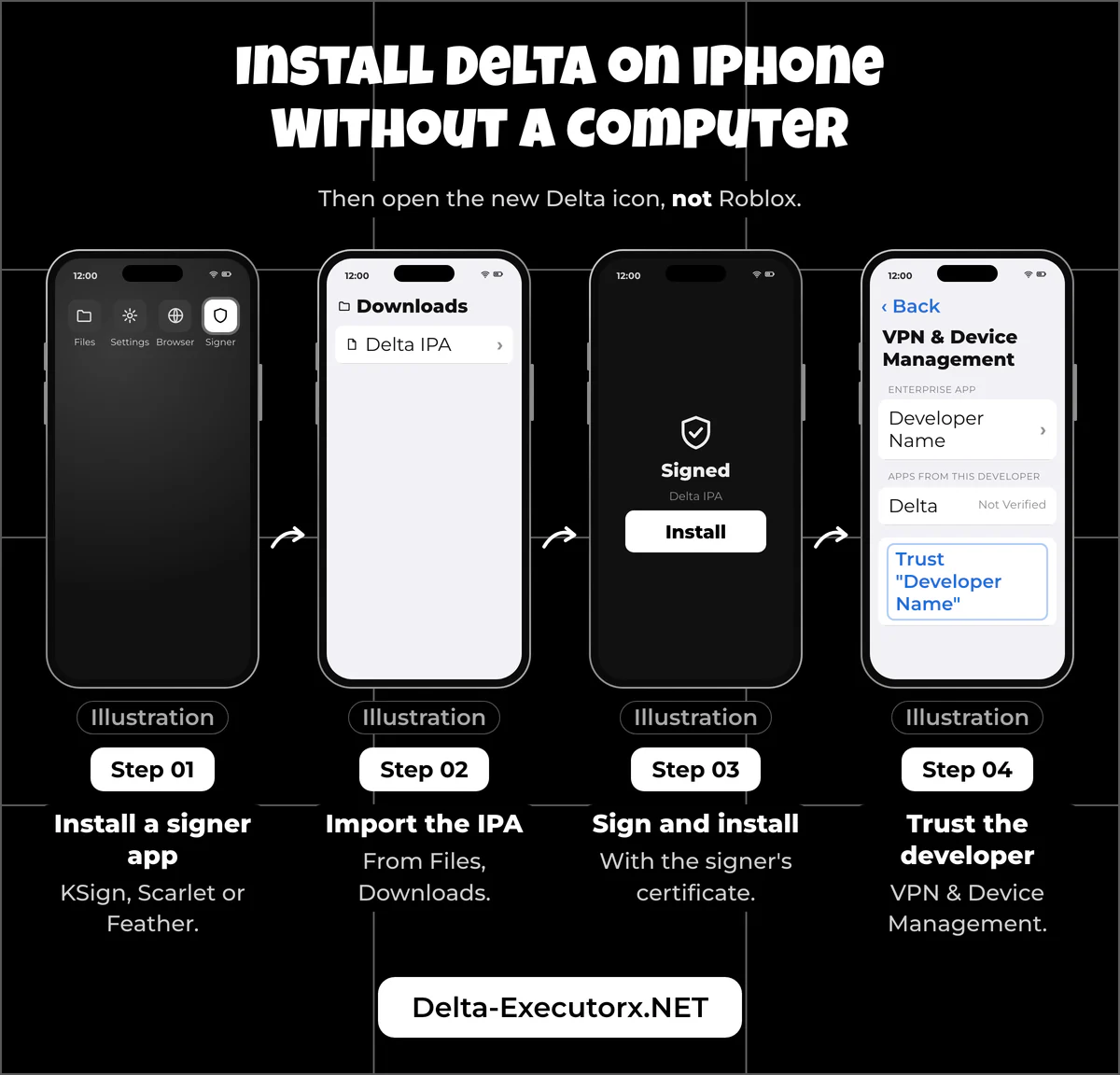
Without a computer, you sign the Delta IPA on the phone with a signer app such as KSign, which is the route the developer's own no-PC guide uses. The app then runs on the signer's certificate, so it keeps working until Apple revokes that certificate.
Step 1: Install a Signer App
Install KSign, the signer the developer's guide names, on your iPhone. Its own GitHub page says KSign is built on Feather and exists because ESign "is no longer in service", so skip any tutorial still sending you to ESign. Scarlet and Feather do the same job of importing and signing an IPA.
A signer can't sign anything without a certificate: a .p12 file, its password and a matching .mobileprovision. No-computer guides hand out a shared one that crowds of strangers sign with at the same time, and that kind of mass reuse is what gets a certificate revoked. If a guide asks you to add a profile first, read the DNS warning below before you agree.
Step 2: Import the Delta IPA
Open the signer and import the IPA you saved from the download box; it sits in the Files app under Downloads. If the name ends in ".ipa.zip", Safari added an extra extension, so long-press the file in Files, choose Rename and delete the ".zip" part. Check that the version matches 2.743 before you continue.
Step 3: Sign and Install
Sign the IPA with the signer's certificate, then tap install. A separate Delta icon appears on your home screen.
Step 4: Trust the Developer
Go to Settings > General > VPN & Device Management, tap the developer name, then Trust. On iOS 18 and newer the button says "Allow & Restart", and you must be online because iOS checks the developer with Apple's ppq.apple.com server. Tap it offline and the entry stays "Not Verified" until you reconnect and press Verify App.
On iOS 14 the menu has an older name, so look under Settings > General for an item containing "Device Management". Apple describes this screen on its page about installing custom enterprise apps on iPhone. When the alert still won't clear, the Delta Executor iOS untrusted developer fix walks through each iPhone message that Trust can and can't solve.
Step 5: Open Delta
Tap the new Delta icon, not the Roblox icon. The first launch asks for a key, which is covered in the usage section further down.
How to Remove a DNS Profile on iPhone
The developer's no-computer guide starts by installing a DNS profile from a third-party site, and that step deserves caution. A DNS profile sends your iPhone's web lookups through whoever made it, for every app on the phone, not just Delta. The ones bundled with signer guides are sold as "anti-revoke": they try to stop the phone from reaching Apple's certificate checks. The same blocking can leave a freshly trusted app stuck on "Unable to Verify". Apple's own trust page says a firewall must let the phone reach ppq.apple.com, which is the kind of traffic these profiles get in the way of.
If you installed one you don't trust, open Settings > General > VPN & Device Management, tap the profile, choose Remove Profile and enter your passcode.
How to Install Delta Executor iOS With a PC
With a Windows PC or Mac, Sideloadly signs the Delta IPA with your own Apple ID, so no stranger's certificate can be revoked under you. You need the computer, the IPA from the download box and an adult Apple ID, ideally a spare one rather than your main account.
- Install Sideloadly on the computer. On Windows, first swap any Microsoft Store copies of iTunes and iCloud for Apple's web installers, which Sideloadly requires.
- Connect the iPhone and accept "Trust This Computer" on the phone.
- Add the Delta IPA to Sideloadly, usually by dragging the file onto its window.
- Enter your Apple ID, then the two-factor code it asks for.
- Click Start and wait for the install to finish.
- Trust the developer on the iPhone in Settings > General > VPN & Device Management.
- Turn on Developer Mode on iOS 16 and newer, then open Delta.
How to Turn On Developer Mode
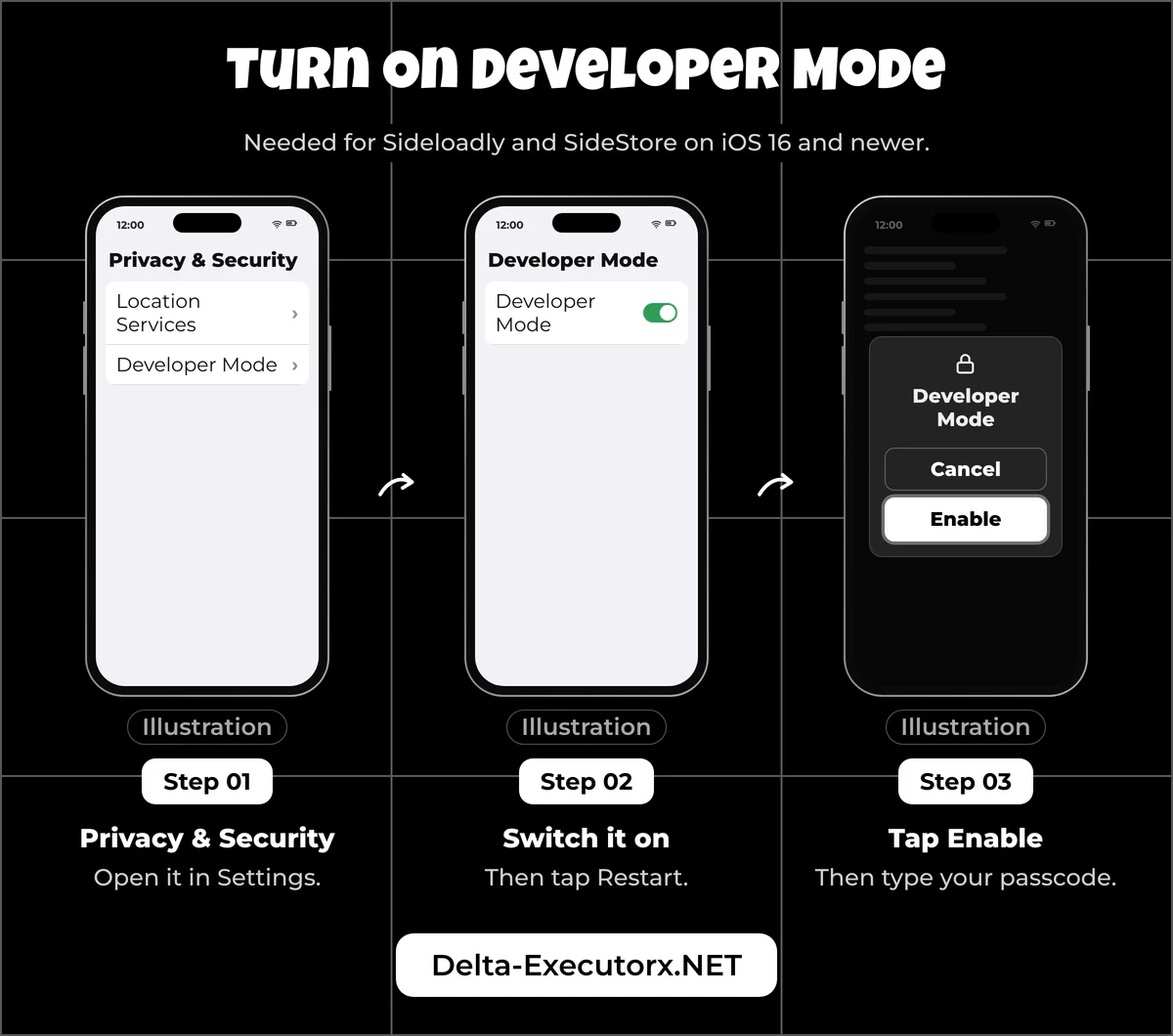
Open Settings > Privacy & Security > Developer Mode, switch it on, tap Restart, then tap Enable and type your passcode. The switch only appears after the iPhone has been connected to a computer, and only the Sideloadly and SideStore routes need it because they sign with your Apple ID.
Sideloadly Errors and Fixes
A Sideloadly error usually names its own cause. The table covers the ones a Delta install can hit; the first four quote Sideloadly's FAQ word for word.
| Sideloadly says | What it means | Fix |
|---|---|---|
| "This device has reached the maximum number of installed apps using a free developer profile" | 3 apps already signed with your free Apple ID | Delete one sideloaded app, then sign again |
| "Your maximum App ID limit has been reached. You may create up to 10 App IDs every 7 days." | Too many new app IDs this week | Wait a few days or use another Apple ID |
| "Call to lockdownd_client_new_with_handshake failed: LOCKDOWN_E_INVALID_HOST_ID" | The phone never trusted this computer | Tap Trust on the iPhone, then restart the computer with the phone still plugged in |
| "Failed to obtain anisette: 500 INTERNAL SERVER ERROR" | A temporary server problem on the login side | Retry later, or pick Local Anisette in Advanced Settings |
| "This Apple account cannot be used for development with Xcode" | A child account in Family Sharing, or an unsupported region | Use an adult Apple ID |
| Developer Mode Required | iOS 16 or newer blocks the app until the switch is on | Follow the Developer Mode steps above |
Why Delta Stops Opening After 7 Days
A free Apple ID gives each sideloaded app 7 days and allows 3 sideloaded apps at a time. Once the week is up, Delta won't open until you sign it again with Sideloadly. SideStore removes most of that chore: you set it up once with iloader on Windows, macOS or Linux. From then on you refresh Delta on the phone itself before the 7 days run out.
Delta Executor iOS Direct Install
The "Direct Install (UNOFFICIAL)" button on the developer's iOS page does not install the developer's file. It sends you to a third-party site, and that site's download has four problems:
- An older build. It has installed Delta builds older than the IPA on this page, which explains many "out of date" errors after a direct install. The site swaps its file often, so the gap moves from week to week.
- A borrowed certificate. The file is signed with an enterprise certificate issued to an unrelated company. Those certificates are meant for a company's own staff apps, and Apple revokes misused ones, which is why direct installs suddenly stop opening.
- Extra code. The app contains code that is not in the developer's own build, and nothing explains what it does.
- Ads and lockers. The developer warns this route "may result in advertisements appearing during gameplay", and the site adds task lockers and a pop-up pushing a VPN app.
That is why this page never links to the direct-install file. If a direct-install copy is already on your phone, replace it with the clean IPA signed through Method 1 or Sideloadly.
Can You Run Delta iOS on PC?
No. Windows can't run iPhone apps, so "Delta iOS for PC" only means using your computer to sideload the IPA onto an iPhone, as in the Sideloadly steps above. Playing on the computer screen itself is a different route, since the developer discontinued Delta for Windows.
That route is the Android build inside an emulator, and the setup lives on the page about running Delta on a Windows PC. One catch matters before you start: since 7 August 2025, Roblox kicks players without edit access to a game when it detects a third-party emulator. The best emulator for Delta comparison scores that problem for each option. Mac owners have different options, and the guide to Delta on Mac or Chromebook sorts out which ones are real.
How to Use Delta Executor on iOS
Open the Delta app and sign in to Roblox inside it. The IPA is a full copy of the Roblox app with Delta added, under its own app ID. It sits next to App Store Roblox as a separate "Delta" icon and does not need it. Some guides tell you to open Roblox first; that is wrong, because Roblox and Delta are two different apps on iOS.
The free version then asks for a key the first time you use it. Free keys come from short website tasks, and the key pages are full of fake buttons. The guide to the Linkvertise, Work.ink and LootLabs key tasks shows which button is the real one. If Delta then rejects the key you pasted, the Delta key not working fix matches each error message to its cause.
With the key active, pick a script from the Delta scripts hub, then join a game and wait until you can move before you run it. The copy, paste and run steps, including the iOS "Allow Paste" prompt, are in the guide to running scripts in Delta.
Any executor breaks Roblox's rules: its Community Standards ban "using or sharing exploits". The Terms of Use also allow Roblox to suspend or close accounts, alternate accounts included. Play on an alt you can afford to lose. The developer calls bans "pretty rare", but that is the vendor's view, and the Delta ban risk page shows how Roblox actually spots modified apps.
How to Update Delta Executor on iOS
To update Delta on iOS, install the newer Delta IPA with the same method you used the first time. Updating Roblox in the App Store changes nothing, because Delta carries its own copy of Roblox inside the IPA.
Signed with the same certificate, the new build normally installs over the old one. After a method switch, say from a signer to Sideloadly, iOS may refuse until you delete the old Delta, and deleting it wipes anything stored inside the app. Back up the scripts you care about first; the guide to saving scripts in Delta shows where they live.
That bundled copy is why iPhone users see "out of date" or "upgrade" messages right after Roblox updates. As of 21 October 2026, App Store Roblox is 2.743.1136 and the newest Delta IPA is 2.743. Whenever the Roblox number is higher, the message is expected until a matching Delta build ships, and the version line in the App Information table changes on the day it does. Delta posts its build news in its Discord server, and the page on the Delta Executor Discord link shows which invite is the real one.
Expect this often. Roblox shipped two iOS updates in nine days (7 and 15 October 2026) while the developer's IPA stayed on the build dated 6 October, so iPhone users were two Roblox builds behind. Don't edit the IPA's version number to skip the prompt: the developer says spoofed versions are detected and risk a ban. The page on the Delta upgrade error and Error 280 explains the mismatch in depth.
Why Is Delta iOS Not Opening?
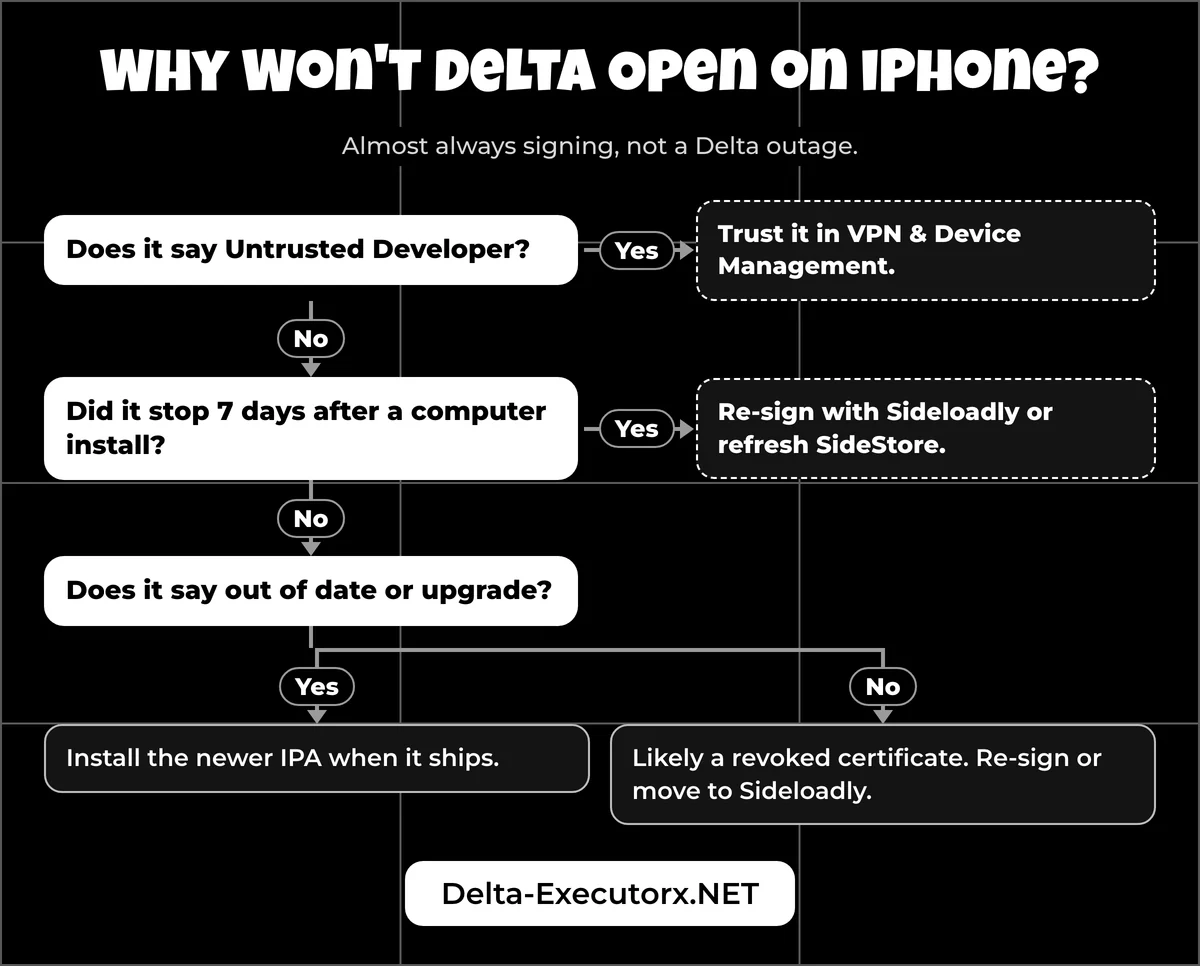
On iPhone, a Delta that won't install or suddenly won't open almost always has a signing or certificate problem, not a Delta outage. Match what you see to one of the rows below; each cause has a different fix.
| What you see | Cause | Fix |
|---|---|---|
| "Integrity not verified", a crash on launch or "Delta is no longer available" | Signing certificate revoked | Wait for a new certificate, or move to Sideloadly |
| "This app cannot be installed because its integrity could not be verified" | The signature is invalid, most often from a revoked or mismatched certificate | Re-sign with a working certificate; trusting again won't help |
| "An internet connection is required to verify..." | Offline, Apple's check server unreachable, or blacklisted from that certificate | Get online and retry, then switch method, for example to Sideloadly |
| "Untrusted Developer" | Developer not trusted yet | Trust it in VPN & Device Management (Step 4) |
| Developer shows "Not Verified" | Trust was tapped while offline | Reconnect and tap Verify App |
| "Unable to install, please try again later" | On a free Apple ID, often the 3-app limit; on a signer, often a dead certificate | Free a slot, or try another method |
| The download ends in ".ipa.zip" and the signer won't take it | Safari renamed the file | Rename it in Files to end in ".ipa" |
| Stops opening exactly 7 days after a computer install | Free Apple ID signature expired | Re-sign with Sideloadly or refresh SideStore |
| "Out of date" or "upgrade" | Roblox is a build ahead of Delta | Install the newer IPA when it ships |
Crashes that start after Delta opens, such as closing when you join a game, have other causes, which the Delta crashing and not opening fix works through. And before you assume Delta is broken for everyone, the Delta status check shows whether a new build is simply on its way. When your problem fits none of these rows, the main troubleshooting checklist narrows it down to Roblox, the build, your key or the script.
Is Delta Executor Safe on iPhone?
Delta is as safe as the route you install it with. The developer's IPA from this page, signed under your own Apple ID, adds far fewer risks than a third-party site with a borrowed certificate. Before you sign it, make sure the download finished and the file name ends in ".ipa"; a much smaller file is incomplete and should be downloaded again.
Stop if you meet any of these red flags:
- A DNS or configuration profile with no explanation of what it does.
- A "complete tasks" or "watch an ad" locker before the IPA download.
- "Unblacklist" or revoke-blocking tools that promise a certificate will never die.
- Anyone selling the IPA or a certificate for it.
- A site or tool, other than Sideloadly or SideStore, asking for your Apple ID.
- A build number lower than the version in the App Information table.
- "Delta X 2.0" offers. Delta X is a nickname for the same app, not a new product.
If a bad copy already got through, the steps to remove Delta from an iPhone clear it out so you can start again with the clean IPA.
FAQ
Is Delta Executor on the App Store?
No. An App Store search for "delta executor" shows only unrelated apps from other sellers, and the app called "Delta Game Emulator" is a retro console emulator with no link to Roblox. Any App Store app claiming to be Delta Executor is a lookalike.
Can I install the Delta APK on an iPhone?
No. APK files are Android packages, and iOS can't open them. iPhone and iPad need the IPA from the download box.
Do I need to jailbreak my iPhone for Delta?
No. Every install method puts a signed app on a normal iPhone, and Roblox flags jailbroken devices with its own anti-cheat message, so jailbreaking only adds risk.
Does Delta Executor work on iPad?
Yes, on iPadOS 14 or newer, from the iPad Air 2, iPad mini 4 and iPad (5th gen) onward. The same IPA covers iPhone and iPad.
Is Delta free on iOS?
Yes, with a free key you earn through short website tasks. Delta Executor Premium is a paid key that skips those tasks, but it is still a key, and the guide to how long a Delta key lasts compares the two.
Does Delta work on iPhone 5s or iPhone 6?
No. Both phones stop at iOS 12, and Roblox needs iOS 14, so neither Roblox nor Delta can install.
Can I install Delta on a school iPad?
Only if whoever manages it allows it. A school or company can push a restriction profile that turns off trust for new enterprise developers; VPN & Device Management then shows "Trusting enterprise apps not allowed", which no signer or setting on the device can get around.
Is there a keyless Delta IPA?
No. Every Delta build asks for a key, and "keyless" IPAs online are not from the developer; the page on Delta keyless versions explains where those files come from.
Conclusion
Delta on iPhone comes down to the right IPA and a signing method that fits your situation: a signer app when you have no computer, Sideloadly or SideStore when you do. Download the IPA from this page, skip the direct-install shortcut, and reinstall the new IPA whenever Roblox moves ahead. Once Delta opens, your next step is to get your free Delta key so you can start running scripts.